( Free · in the browser · no sign-up )
Audio equalizer online Boost bass, shape mids, tame treble
Choose 3, 10, or 20 bands and move each one between −12 and +12 dB, with ten presets as starting points.
Or drop an audio or video file anywhere on this page. Supports: MP3, WAV, M4A, AAC, FLAC, OGG, WebM, MP4, MOV, MKV, and more.
The file you choose is processed in this tab; the page still loads site resources and consented analytics. Read the Privacy Policy.
- 01No installation
- 02Audio processed locally
- 03Preview before export
- 04No account
( What it is )
What an audio equalizer does, and how many bands you need
Whether you're fighting muddy bass on a podcast recording, boosting presence on a voice-over, or fine-tuning the treble on a music track — our browser-based EQ gives you practical frequency control without software installation or subscription costs.
Music & Productions
Boost bass on electronic tracks, balance mids in guitar recordings, or tame harsh treble on overloaded synths. Get practical EQ results that used to require expensive studio gear — now in your browser after local processing.
Podcasts & Voice-Overs
Eliminate the boxiness of home recordings with a cut around 250 Hz. Lift presence at 4 kHz so speech cuts through. Take the weight off the bottom with the 31 Hz and 44 Hz bands, or use the high-pass filter on the noise page for anything lower — all without touching a DAW.
Video Soundtracks & Streaming
Fine-tune audio frequencies in soundtracks to match the tonal balance expected on YouTube, Spotify, and streaming platforms. Correct recording imbalances before uploading to maximize listener engagement.
( How it works )
How to equalize audio in 3 steps
practical-quality EQ after local processing. No learning curve, no DAW required — just upload, adjust your frequency bands, and export.
- ( 01 / 03 )
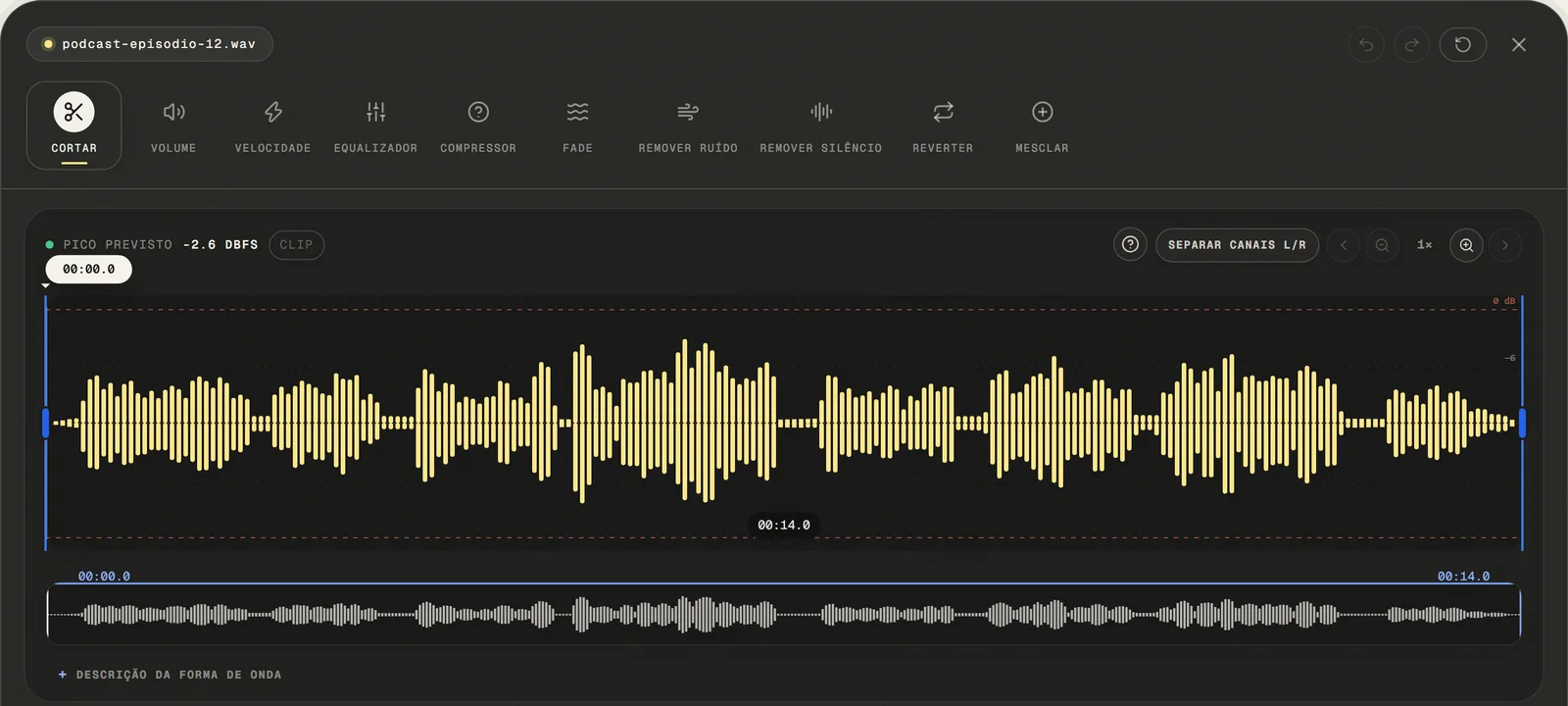
Upload Your Audio File
Choose a common audio or video file, paste a public link, or use the microphone. For video, only the first compatible audio track is opened.
local processing
- ( 02 / 03 )
Adjust Bass, Mid & Treble
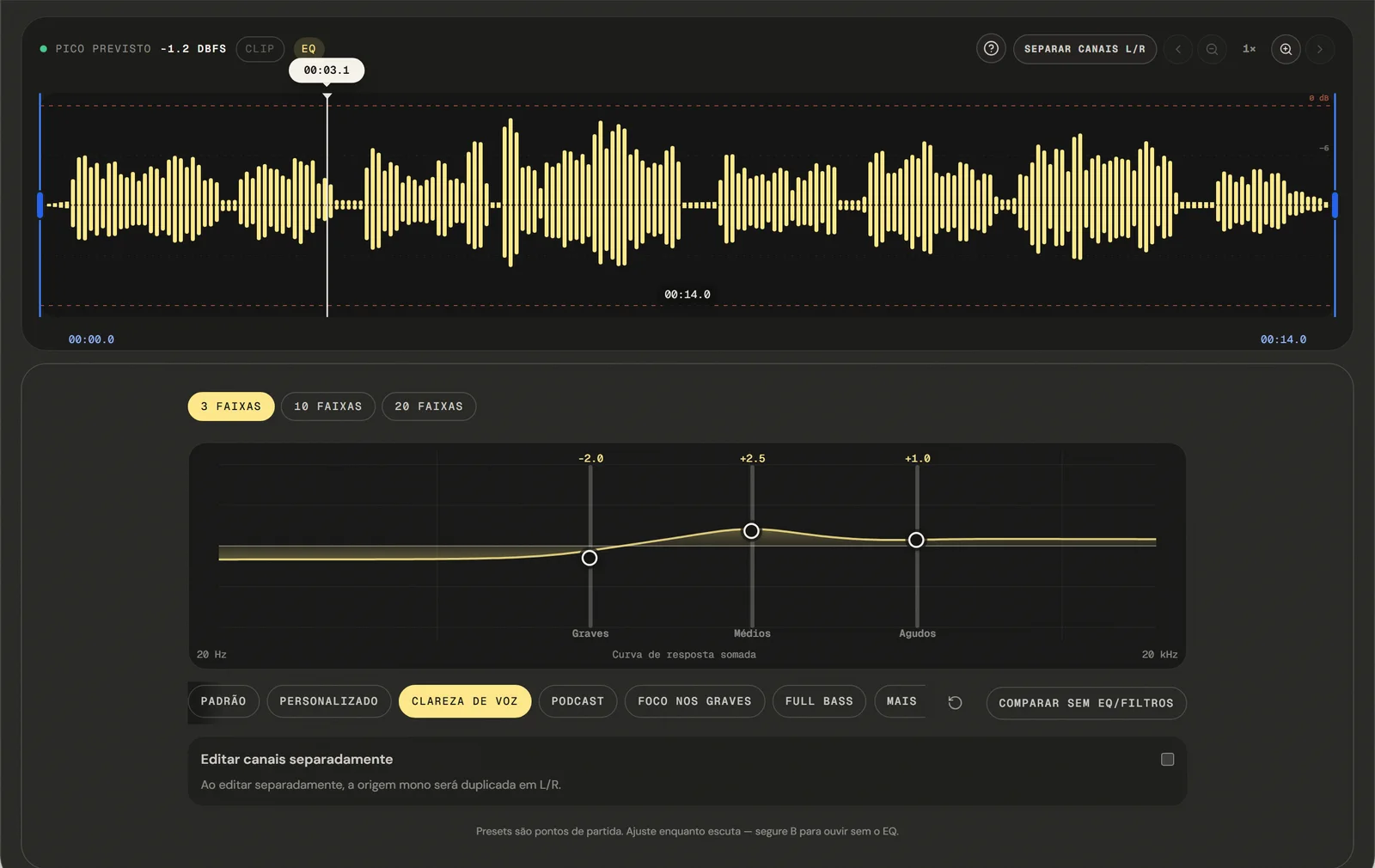
Move the Bass, Mid, and Treble sliders independently to sculpt your sound. The equalizer offers 3, 10, or 20 fixed bands from −12 to +12 dB; the centre frequencies and the width of each band do not change. Changes apply and preview in real time.
Real-Time Preview
- ( 03 / 03 )
Export and Download Your EQ'd File
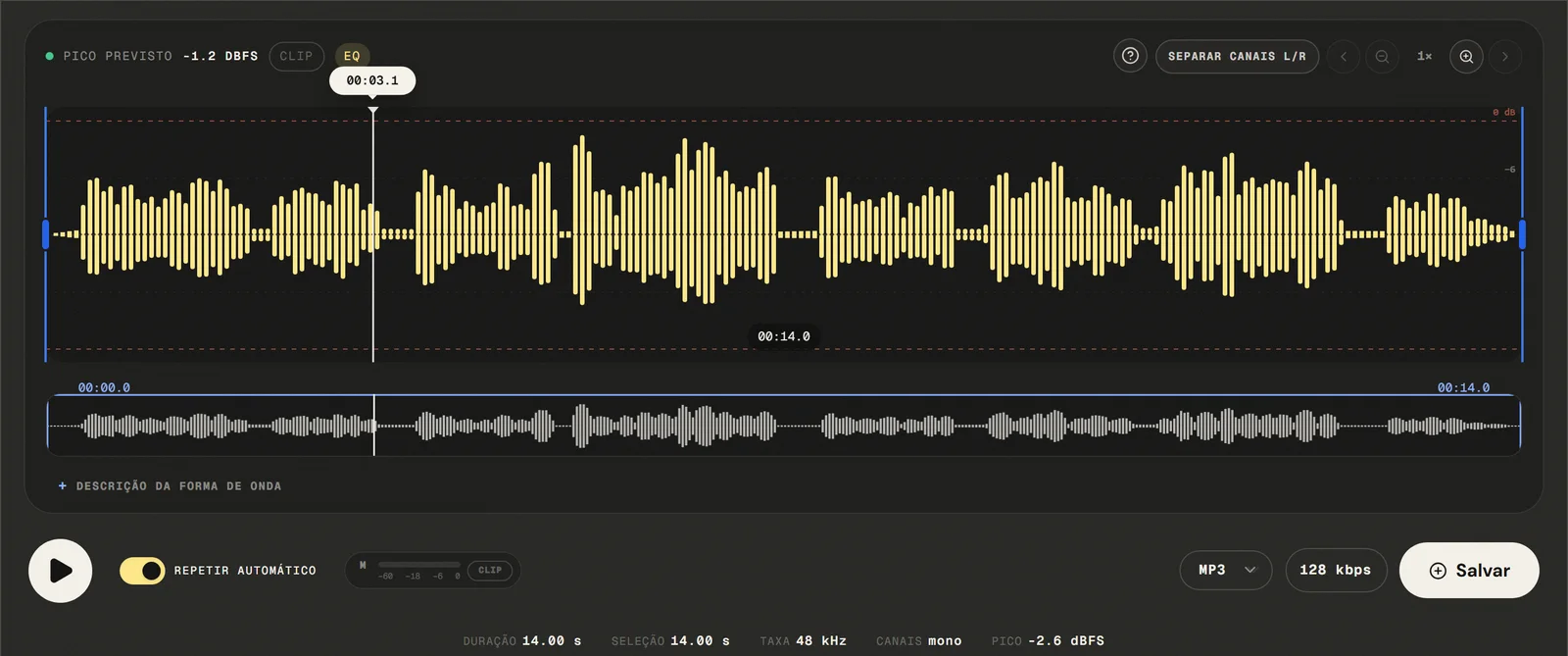
Click "Export", choose your output format (MP3, WAV, M4A, or FLAC) and quality level. Your equalized file downloads after local processing — no watermark, no account needed, no re-upload required.
No Watermarks
( Precision )
Three layouts: 3 bands, 10 octave bands, or 20 half-octave bands
Our online EQ tool provides practical frequency control for every audio type — all running locally in your browser.
- 01
3 to 20 Frequency Bands
Adjust each band independently, with its own slider and a range of ±12 dB. Three bands for a quick tonal fix; ten or twenty when one region needs a different amount than its neighbour.
- 02
Starting Points for Common Material
Choose from built-in presets designed for common use cases: Voice (presence boost, mud cut), Podcast (warmth + clarity), Bass Boost, Treble Boost, and Flat. Start with a preset and fine-tune from there.
- 03
Real-Time Audio Preview
Hear your EQ adjustments immediately as you move the sliders. The audio plays back in real time with the applied EQ curve — no need to re-export to check your work.
( Why in the browser )
Why an EQ online beats re-recording the take
practical EQ plugins and desktop DAWs like Logic Pro or Ableton Live require expensive licenses and steep learning curves. Our browser-based equalizer gives you the same frequency control in under ten seconds.
- ( 01 )
Open It and Start, No Install
Open your browser and start equalizing in under ten seconds. No download, no setup wizard, no system requirements. depends on the browser's audio capabilities Windows, macOS, Linux, iOS, and Android.
- ( 02 )
Processed in your browser
Your audio never leaves your device. EQ processing runs entirely in your browser using Web Audio API and browser JavaScript. The selected audio file is processed locally in this browser tab.
- ( 03 )
Three Layouts: 3, 10 or 20 Bands
Start on bass, mid and treble at 320 Hz, 1 kHz and 3.2 kHz. Switch to ten octave bands from 31 Hz to 16 kHz, or twenty half-octave steps, and the curve you built carries over. Every band moves between −12 and +12 dB, and ten presets give you somewhere to start.
( Other tools )
Other free audio tools
Open only the tool needed for the next step in your file.
( Where your audio goes )
( File processing )
Your audio is equalized in this tab, not uploaded
The chosen audio file is decoded and edited locally. The page may make connections for site resources and consented analytics.
Read the Privacy PolicyFile in browser memory
. The audio file is not sent to the application server to perform the edit.Device limits
. Long files require more memory; the practical limit varies by device and browser.Local export
. The result is rendered in the browser. Compressed formats are re-encoded.
( Questions? Answered )
Questions about equalizing audio online
Direct answers about how the current tool works.
What is an audio equalizer?
An equalizer changes how loud each range of frequencies is inside a file you already have. Lowering the low range thins out a boomy recording; lifting the high range opens up a dull one. It rebalances what is in the audio rather than adding anything to it, which is why it can fix tone but cannot recover a detail the microphone never captured.
Which frequencies can I actually adjust?
That depends on the layout you pick. Three bands gives bass, mid and treble at 320 Hz, 1 kHz and 3.2 kHz. Ten gives the octave centres from 31 Hz to 16 kHz. Twenty adds the half-octave steps between them, from 31 Hz to 18 kHz. Every band moves between −12 and +12 dB.
How many bands should I use?
Three, until three is not enough. Most of what people come here to do — take weight off a boomy recording, lift a voice, add low end — is a broad move, and a broad move is easier to judge on three sliders than on twenty. Reach for ten when one region needs a different amount than its neighbours, and twenty when you are chasing something narrow, like a room resonance sitting between two octave centres.
How do I add bass without the track distorting?
Raise the 320 Hz band in small steps and listen at the loudest part of the file. Boosting adds level, so if the result starts to sound hard, lower the overall volume with the volume tool and try again.
How do I reduce bass that is too heavy?
Pull the 320 Hz band down a little at a time and keep checking the loudest section. Boom in speech and in room recordings usually sits around and just above that centre, so a small cut often clears it without leaving the file thin. If the weight is lower than the band reaches, the high-pass filter on the noise page cuts further down.
How do I make a recorded voice sound clearer?
Lift the 1 kHz band a little and ease the 320 Hz band down. Most muddiness in speech sits in the low mids, and taking a small amount out there usually does more than boosting the top.
What settings work for a podcast or voice-over?
Start with a small cut at 320 Hz and a small lift at 1 kHz, then listen to a full sentence with A/B rather than a single word — tone is easier to judge over a phrase. Leave the treble alone unless the recording sounds dull, since lifting 3.2 kHz also brings up sibilance. If speakers sit at different loudness, even that out with the volume tool afterwards instead of with the EQ.
How is this different from the EQ in a desktop editor?
A desktop mixing EQ lets you place a band at any frequency and set how wide each one is, which is what you need to notch out a single resonance. Here the centres are fixed — at the octave points a graphic equalizer uses — and so is the width. For getting a voice or a track to sit right, twenty fixed bands cover it; for surgical work on one exact frequency, they do not.
Can I move a band to a different frequency?
No. You choose between three layouts — 3, 10 or 20 bands — and within each one the centres and widths are set. The equalizer offers 3, 10, or 20 fixed bands from −12 to +12 dB; the centre frequencies and the width of each band do not change. For a bass-focused workflow the bass booster page covers that intent separately.
Can I hear the difference before exporting?
Yes, and there are two ways. The A/B button switches between the equalized signal and the original, and holding the B key does the same for as long as you hold it, which is easier when you want to flip back and forth quickly. Both use the same filters the export uses, so what you hear is what gets rendered.
What do the presets do?
Each one is a tone curve rather than a fixed set of slider positions, so the same preset fills three sliders or twenty. Ten are included: voice clarity, podcast, bass focus, full bass, bright, warm, soft, club and rock, plus flat to start over. They are starting points — pick the nearest one and adjust while listening.
Does it work on a phone?
Yes. Three bands fit a phone screen as they are, and the wider layouts scroll sideways so each slider keeps a thumb-sized target instead of being squeezed. The practical limit is memory rather than the interface: a long file that opens on a desktop can fail to decode on an older phone.
Does equalizing reduce the audio quality?
The filtering itself is applied to decoded samples. Export is where quality can shift: saving back to MP3 runs another encoding pass, so choose 16-bit PCM WAV or FLAC when you want to avoid it.
Which formats can I open and export?
Common audio and video containers are accepted: the editor tries native decoding first and falls back to a local FFmpeg build to pull the first compatible audio track. Exports are MP3 from 64 to 320 kbps, 16-bit PCM WAV, M4A/AAC at 192 kbps, and FLAC.
Do I need an account, and how many files can I equalize?
No account, no email and no sign-up, and there is no cap on how many files you run. Size is limited by what the browser tab can hold rather than by a rule we set, so the ceiling moves with the device.
Is my audio file uploaded to a server?
The audio is decoded and equalized locally in this browser tab and is not sent to the application server to perform the edit. The page itself still loads site resources and consented analytics.
( Product evidence )
How this audio equalizer was tested
Tests verify that the three-band layout still builds the filters it always did, that the wider layouts place shelves at the ends and peaks between them, that presets resolve onto every layout, and that the export renders the layout the preview played.
Reviewed 3 September 2026
Read the methodology( 01 — Tested )
Test coverage
Environment: capability matrix v1, unit tests, and Chromium desktop and mobile profiles.
( 02 — Limits )
Device constraints
Processing time and support for additional inputs vary with device memory, browser capabilities, and the codecs contained in the file.
( Field notes )
Learn the technique behind the tool
Guides written and reviewed by the person who builds the editor, including the real limits of each feature.
- ( 01 ) · 14 min read
How to Equalize Audio Online for Voice, Music and Podcasts
Learn to equalize audio on a graphic EQ of 3, 10 or 20 bands, understand the frequency regions, and know the limits of fixed bands.
Read - ( 02 ) · 15 min read
How to EQ Voice, Music and Podcasts Online
A practical online EQ guide for voice, music, podcasts, lessons and phone recordings. Learn bass, mids, treble and safe equalizer settings.
Read - ( 03 ) · 9 min read
Audio Editing Glossary: 40 Terms Every Content Creator Needs to Know
Audio editing glossary with 40 essential terms. Learn what bitrate, normalization, clipping, EQ and compression mean — clear definitions for podcasters and content creators.
Read
( Ready when you are )
Audio equalizer online
Equalize music, podcasts, and recordings directly in your browser with frequency controls and without uploading the file to our servers.