( Free · in the browser · no sign-up )
Free online audio editor Edit and export in your browser
Cut it. Level it. EQ it. Fade it. Speed it up. Export it.
Open audio or video, inspect a detailed waveform, zoom around the playhead, make a focused edit, and export as MP3, WAV, M4A/AAC, or FLAC.
Or drop an audio or video file anywhere on this page. Supports: MP3, WAV, M4A, AAC, FLAC, OGG, WebM, MP4, MOV, MKV, and more.
The file you choose is processed in this tab; the page still loads site resources and consented analytics. Read the Privacy Policy.
- 01No installation
- 02Audio processed locally
- 03Preview before export
- 04No account
( What it is )
Edit audio without
installing apps. creating accounts. leaving the tab.
Audio-Editor Online provides one focused workspace for common audio edits. Common audio and video formats are accepted when they contain a compatible audio track. Editing happens in browser memory, with MP3, WAV, M4A/AAC, and FLAC export.
( In · out )
Input and output formats
Open common audio and video formats; for video, the editor extracts only the first compatible audio track. Export as MP3, 16-bit PCM WAV, M4A/AAC at 192 kbps, or FLAC.
- MP3
- WAV
- M4A
- FLAC
( Try it here )
Move a slider.
Watch the wave change.
A small preview of four editor controls. Push the gain past 100% and the clipping warning lights up, as it does on the editor's peak meter.
Do this to your audioWaveform · demo
This panel is a drawing, not audio: it shows what each control does to the shape of a waveform. The editor itself decodes your file and processes the samples in the browser.
( How it works )
How to use it in 3 steps
Our interface is designed to be intuitive for both beginners and professionals.
- ( 01 / 03 )
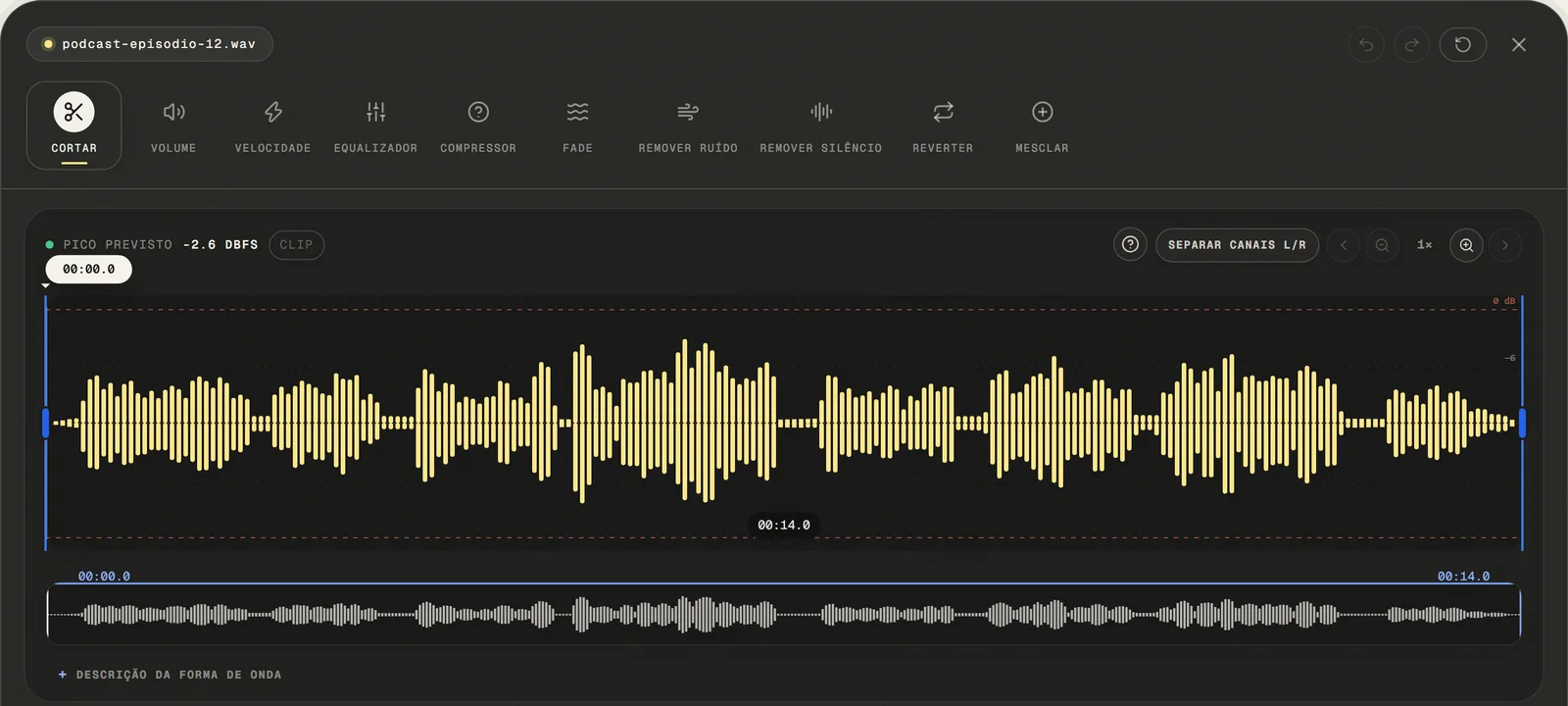
Upload the Audio
Choose a common audio or video file, paste a public link, or use the microphone. For video, only the first compatible audio track is opened.
Fast Upload
- ( 02 / 03 )
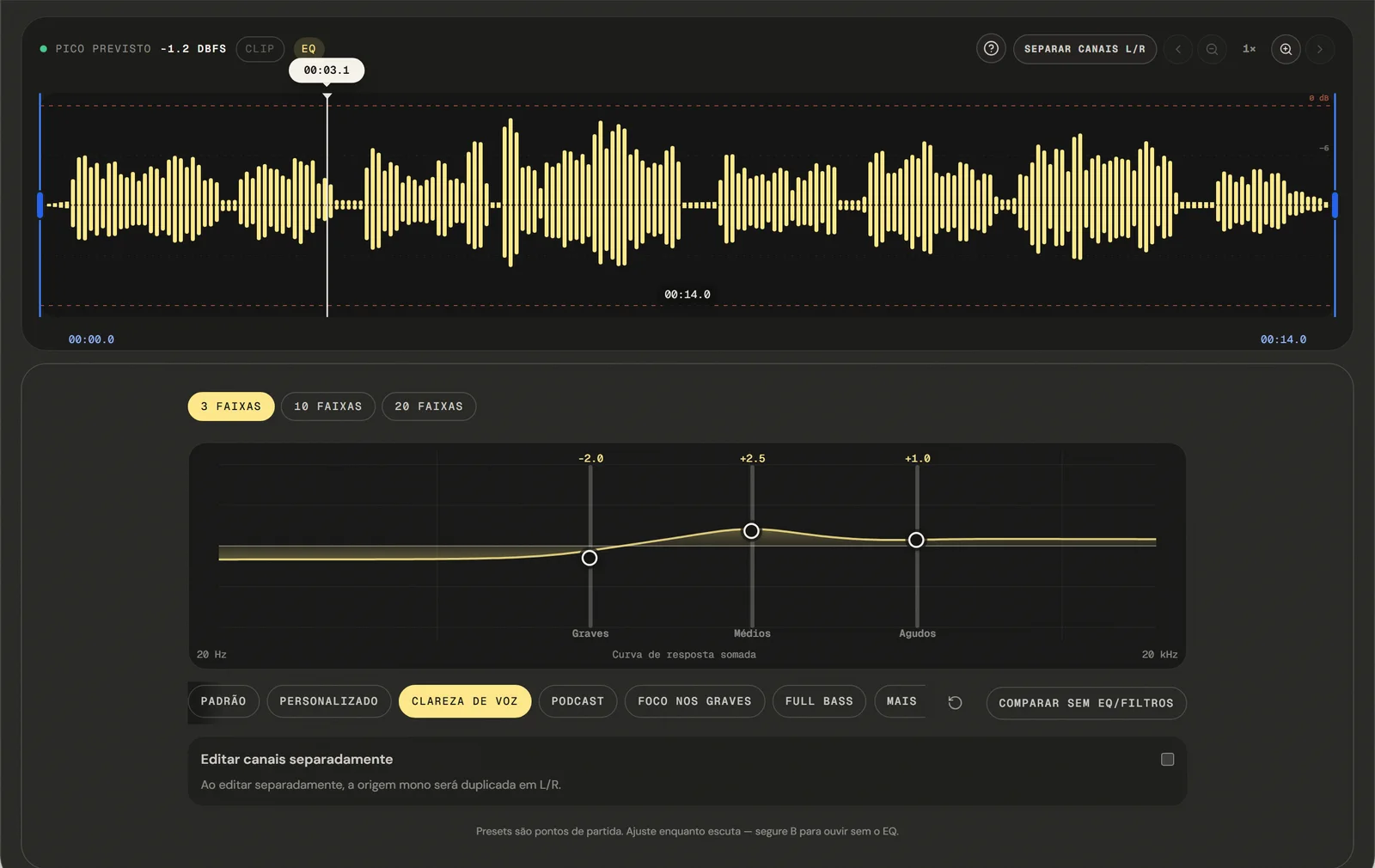
Apply Adjustments
Use the side menu to select tools: adjust volume, change speed, clean noise, or apply fade effects. See changes in real-time.
Real-time Adjustment
- ( 03 / 03 )
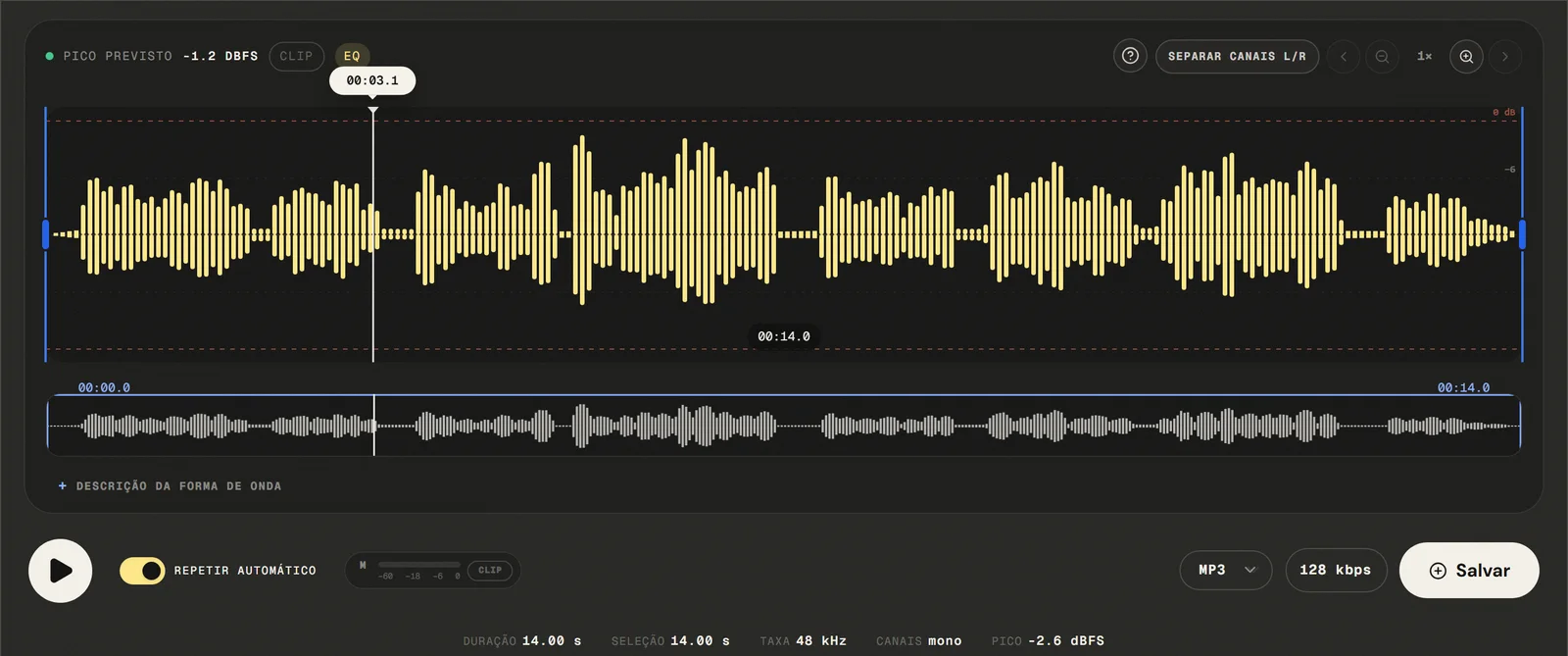
Export and Download
When finished editing, choose MP3 at 128, 192, or 320 kbps, 16-bit PCM WAV, M4A/AAC, or FLAC.
Local Export
( Precision )
More precision without complicating the edit
The editing workspace combines detailed visual feedback with focused controls so you can locate, inspect, and adjust audio quickly.
- 01
Detailed adaptive waveform
HiDPI rendering scales to the file's highest peak so the focused waveform remains visible with greater definition.
- 02
Playhead-centered zoom
Zoom uses the current playback point as its anchor; follow playback slides the waveform beneath a centered playhead.
- 03
Independent L/R channels
Split the stereo view, enable or disable either channel, and apply compatible adjustments independently.
- 04
Visible peaks and clipping
The post-processing meter shows L/R levels and keeps the clipping warning latched until you reset it.
- 05
Precise selection and cuts
Use markers, exact times, boundary previews, and an optional 5 ms microfade to reduce clicks at cuts.
- 06
Shortcuts and history
Control playback and selection from the keyboard and undo or redo supported destructive edits.
( The toolkit )
Online Tools to Edit, Improve and Export Audio
- 1
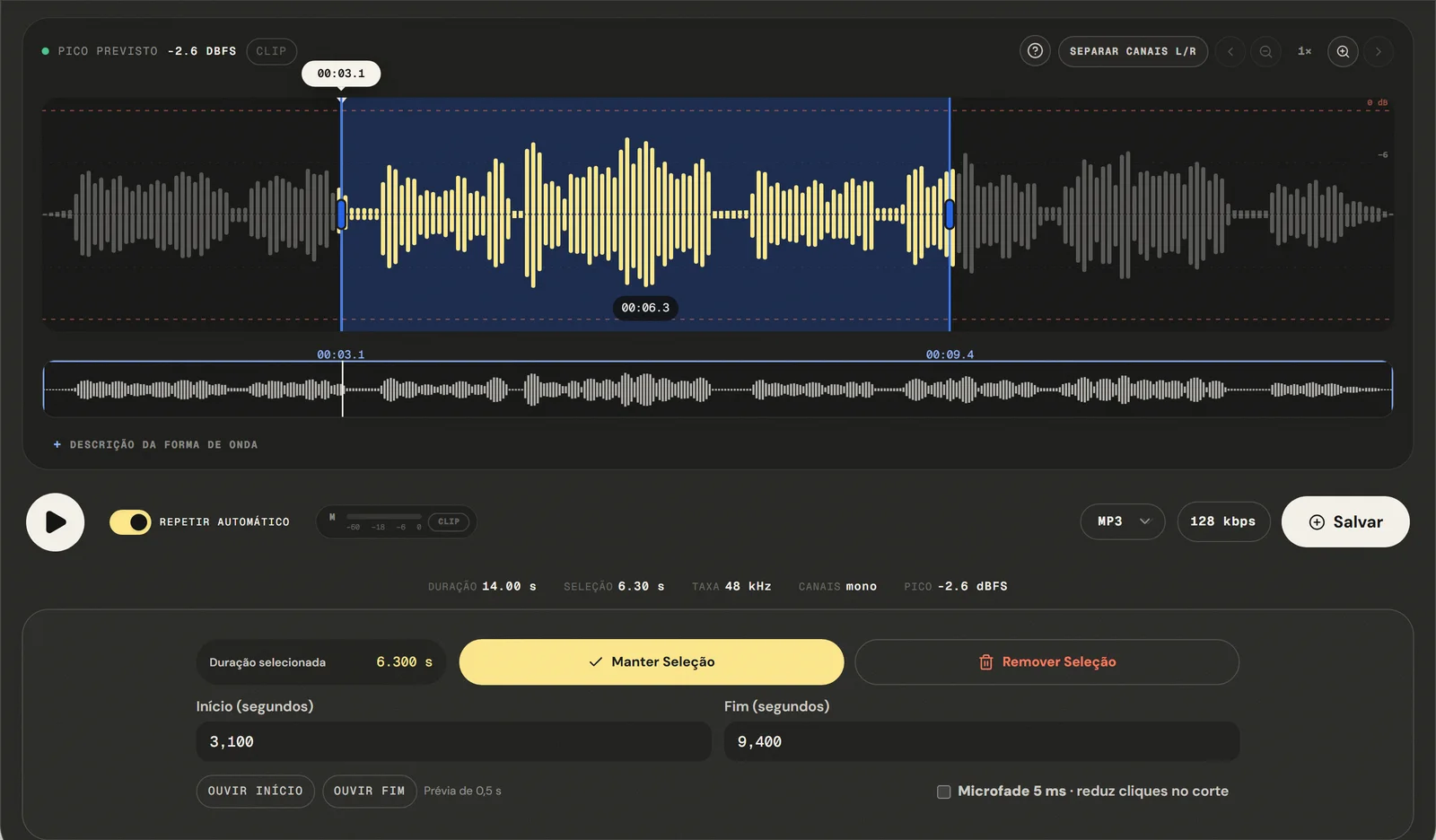
Cut Audio Online
Set the selection on the waveform, keep or remove that section, preview the cut, and then export. Compressed formats are re-encoded.
Open → - 2
Adjust Volume
The control applies linear gain from 0% to 200%, shows predicted peak and clipping, and can normalize peak to −1 dBFS; it does not measure LUFS loudness or true peak.
Open → - 3
Change Speed
The 0.5x to 3x preview changes immediately and preserves pitch; final processing happens locally during export, and extreme values can still introduce artifacts.
Open → - 4
Remove Noise
The available controls are high-pass filtering for rumble and low-pass filtering for hiss; they do not isolate voices or learn a noise profile.
Open → - 5
Audio Equalizer
Pick 3, 10 or 20 fixed bands, inspect the response graph, and compare with the original.
Open → - 6
Reverse Audio
Reverse the whole file or the current selection, preview the result, and apply it before choosing an export format.
Open → - 7
Merge Audio Files
Add files to a queue, reorder or remove them, preview the sequence, and join them in order without overlap.
Open → - 8
Fade In / Fade Out
Apply a linear fade at the start or end of the file and preview the selected duration before export.
Open →
- Tools, each with its own page
- 13
- Equalizer bands, at most
- 20
- Export formats
- 4
- Accounts needed to edit and export
- 0
( What people use it for )
Tasks that fit the editor
- ( 01 )
Prepare a voice recording
Cut mistakes, adjust gain, and apply a short fade after previewing each change.
- ( 02 )
Save one excerpt
Set exact times, keep the selection, and export the excerpt as another file.
- ( 03 )
Arrange parts in sequence
Queue files, reorder them, preview the sequence, and join them without overlap.
- ( 04 )
Make a tonal correction
Pick 3, 10 or 20 equalizer bands and compare with the original audio.
( Where your audio goes )
( File processing )
Audio is processed in this browser tab
The chosen audio file is decoded and edited locally. The page may make connections for site resources and consented analytics.
Read the Privacy PolicyFile in browser memory
. The audio file is not sent to the application server to perform the edit.Device limits
. Long files require more memory; the practical limit varies by device and browser.Local export
. The result is rendered in the browser. Compressed formats are re-encoded.
( Questions? Answered )
Questions about free online audio editor
Direct answers about how the current tool works.
What does this tool change?
Cut a selection, adjust gain, use a 3-, 10- or 20-band equalizer, apply a linear fade, change speed, filter rumble or hiss, reverse samples, or append files in sequence.
How can I check the result?
The editor shows duration, selection boundaries, sample rate, separate L/R channels, a post-processing peak meter, and the relevant settings before export. The demo audio lets you inspect every tool without choosing a personal file. Automated tests cover real WAV, MP3 and video-to-audio workflows, adaptive HiDPI waveform rendering, zoom, L/R channel controls, peak metering, shortcuts, history, and mobile layout.
What are the limitations?
Common audio and video containers are accepted. The editor tries native decoding first and then a local FFmpeg fallback; the file must contain a compatible audio track, and practical size depends on device memory.
Which formats can I open and export?
The editor accepts common audio and video formats, tries native decoding, and uses local FFmpeg as a fallback to extract the first compatible audio track. Outputs are MP3 from 64 to 320 kbps, 16-bit PCM WAV, M4A/AAC at 192 kbps, and FLAC.
Is the audio sent to the server?
The chosen file is processed locally in this tab. The page may still load site resources and consented analytics.
( Product evidence )
What has been verified in this tool
The demo audio lets you inspect every tool without choosing a personal file. Automated tests cover real WAV, MP3 and video-to-audio workflows, adaptive HiDPI waveform rendering, zoom, L/R channel controls, peak metering, shortcuts, history, and mobile layout.
Reviewed 3 September 2026
Read the methodology( 01 — Tested )
Test coverage
Environment: capability matrix v1, unit tests, and Chromium desktop and mobile profiles.
( 02 — Limits )
Device constraints
Processing time and support for additional inputs vary with device memory, browser capabilities, and the codecs contained in the file.
( Field notes )
Learn the technique behind the tool
Guides written and reviewed by the person who builds the editor, including the real limits of each feature.
- ( 01 ) · 15 min read
Online Audio Editor: Tools, Workflow and Real Limits
Guide to online audio editing with cutting, gain, a 3- to 20-band EQ, noise filters, speed, channels and export, including the tool's real limits.
Read - ( 02 ) · 13 min read
How to Cut Audio Online with Precise Edits
Learn to select, keep or remove audio with zoom, boundary preview and optional microfade, including the real limits of precision and export.
Read - ( 03 ) · 13 min read
How to Adjust Audio Volume Online without Distortion
Learn to set gain from 0 to 200% and normalize sample peak to -1 dBFS while distinguishing peak, LUFS, true peak and clipping.
Read - ( 04 ) · 14 min read
How to Equalize Audio Online for Voice, Music and Podcasts
Learn to equalize audio on a graphic EQ of 3, 10 or 20 bands, understand the frequency regions, and know the limits of fixed bands.
Read - ( 05 ) · 11 min read
MP3, WAV, FLAC, AAC: Which Audio Format Should You Use?
Understand the differences between MP3, WAV, FLAC, AAC, OGG and M4A. Practical comparison with a table and format recommendations for podcasting, streaming, editing and archiving.
Read - ( 06 ) · 14 min read
LUFS Audio Volume Guide for Podcasts, Videos, Lessons and Music
Understand integrated loudness and true peak, why this editor does not measure LUFS, and how to verify current delivery requirements externally.
Read
( Ready when you are )
Free online audio editor
Transform your recordings with practical-level tools for free, simply and securely.