Custom Phone Ringtones · iPhone M4R & Android MP3
Online Ringtone Maker — Create iPhone M4R & Android MP3 Ringtones
Cut up to 40 seconds of a song or recording into a ringtone. Type the start and end in seconds, add an S-curve fade in and out, raise the peak to −1 dBFS, and download M4R (AAC) for iPhone or MP3 for Android.
The file opens in the full editor, on this tool: waveform, selection, before/after preview, undo and export.
( Device Setup )
How to Install Custom Ringtones on iPhone and Android
iPhone (iOS) Step-by-Step Installation
Method 1 (Computer): Download the .m4r file. Connect your iPhone to your Mac (Finder) or Windows PC (iTunes). Drag and drop the .m4r file directly into the 'Tones' section of your iPhone. Go to Settings > Sounds & Haptics > Ringtone to select it.
Method 2 (No PC via GarageBand): Download the audio file to your iPhone. Open Apple's free GarageBand app, import the audio track, tap the Project browser, long-press the song, select Share > Ringtone, and choose 'Use sound as standard ringtone'.
Android Step-by-Step Installation
Download the .mp3 ringtone directly to your Android phone.
Open Settings > Sound & vibration > Phone ringtone.
Tap 'My Sounds', 'Custom Ringtone', or the '+' icon in the top right corner.
Select your downloaded MP3 file from your Downloads folder and tap Save / Apply.
The Acoustic Limits of Smartphone Transducers & Peak Normalization
Smartphones rely on miniature micro-speakers housed in tight acoustic enclosures. These transducers suffer from physical excursion limitations and low electro-acoustic efficiency below 300 Hz. If an audio track has uncontrolled dynamics or heavy sub-bass content, the miniature amplifier either triggers aggressive internal digital protection limiters or enters severe non-linear harmonic distortion.
Our ringtone generator applies smart peak normalization calibrated to -1 dBFS (roughly 89.1% full scale voltage). This boosts quiet passages so your ringtone rings loudly and clearly in noisy ambient surroundings, while leaving 1 dB of true-peak safety headroom to prevent DAC inter-sample clipping on mobile audio chips.
Why iOS Enforces a Strict 40-Second Ringtone Ceiling
In Apple's iOS CoreAudio framework and the iTunes synchronizer daemon, ringtones are handled under specialized telecommunication constraints. While a standard music track has no length limitation, the iPhone's incoming call daemon automatically terminates ringtone loop playback after 30 to 40 seconds before routing to voicemail.
Crucially, if an imported audio file exceeds 40 seconds (even by a single frame), iTunes and macOS Finder will refuse to classify it as a ringtone (.m4r), silently categorizing it as a regular music file or ignoring it completely. Our tool stops the clip at 40 seconds so the file stays inside that limit; you still add it to the phone through Finder, iTunes or GarageBand.
Anti-Pop S-Curve Envelope Fading
When audio is cut abruptly at non-zero crossing points, the sudden voltage drop from a non-zero sample to complete silence creates an acoustic impulse. To human ears, this sudden step function sounds like an annoying click, pop, or transient crackle.
Our ringtone generator applies raised-cosine S-curve fades (0.5s by default) at both the start and end of the excerpt. The derivative of an S-curve is zero at both boundaries, ensuring completely silent entry and exit without mechanical popping on your smartphone's speaker cone.
( Workflow )
How to Create Custom Phone Ringtones in 4 Steps
Upload Your Song
Drop an MP3, WAV, M4A or FLAC file (up to 256 MB). It opens in the full editor with the first 30 seconds selected.
Select the Best Hook (Max 40s)
Drag on the waveform over the chorus or hook, or use the 15 s, 30 s and 40 s buttons. The download never runs past 40 seconds.
Configure Fades & Loudness
Enable smooth S-curve fade-in/out to prevent clicks, and activate -1 dBFS mobile speaker normalization for crisp volume.
Download M4R or MP3
Click Download iPhone (.m4r) for Apple devices or Download Android (.mp3) for Android phones and tablets.
( Knowledge Base )
Frequently Asked Questions About Custom Ringtones
What is an M4R file and how is it different from M4A?↓
An M4R file is structurally identical to an AAC-encoded M4A file in an MPEG-4 container. Apple uses the distinct .m4r extension exclusively as a flag to notify iTunes, Finder, and iOS that the file is intended to be stored in the device's system ringtones library rather than the music library. Our tool encodes AAC at 192 kbps into an MPEG-4 file and saves it with the .m4r extension.
What is the maximum ringtone length for iPhone?↓
iOS strictly limits custom ringtones to 40 seconds. While Apple recommends 30 seconds for standard incoming phone calls, any ringtone between 0.1s and 40.0s will successfully sync. If an M4R file is 40.1 seconds or longer, iOS will silently reject it from the ringtone library. Text tone alerts (SMS) are typically best set between 2 and 5 seconds.
Why should I use S-curve fades on a ringtone?↓
Cutting digital audio in the middle of a loud transient or non-zero waveform sample produces an instantaneous step down to zero voltage. When fed into a smartphone speaker, this step creates a sharp acoustic click or pop. A smooth 0.5-second S-curve fade ramps the audio amplitude smoothly to zero, preventing speaker popping and creating a polished, professional entrance and exit.
Are my audio files uploaded to a remote server?↓
No. All waveform analysis, slicing, fade envelope processing, and audio encoding occur 100% inside your web browser using Web Audio API and client-side processing. Your songs and recordings never leave your device.
( Practical guide )
Making a ringtone that starts in the right place
A ringtone is heard in its first two or three seconds; most calls are answered or rejected before the chorus arrives. So the job is less about the length and more about where the clip starts. The ringtone mode runs inside the editor, so you can see the waveform, find the loud entry of the chorus, and clean or adjust the audio before downloading.
Settings for each kind of clip
| Chorus that starts loud | Fade-in 0 or 0.5 s, so the first beat is not lost |
|---|---|
| Quiet intro or acoustic song | Keep peak normalization on, so the clip reaches −1 dBFS and is heard in a pocket |
| Notification or alarm sound | 15 s button, short fade-out |
| iPhone | M4R, at most 40 seconds; longer selections are cut to the first 40 s |
Worked example: a 30-second chorus for Android and iPhone
- Open the song. On the waveform the chorus usually shows as the point where the wave gets taller and denser.
- Drag a short selection that starts just before that point, then press 30 s: the buttons extend the selection from where it starts. Play it to check it begins on the beat.
- Leave the fades at 0.5 s and normalization on, then download the MP3 for Android and the M4R for iPhone.
- On Android, copy the MP3 to the Ringtones folder or pick it in Settings → Sound. On iPhone, add the M4R through Finder, iTunes or GarageBand.
Two files of about 720 KB (MP3 at 192 kbps for 30 s), starting on the chorus instead of a quiet intro.
Limits
- The download uses the waveform as it is. Volume, EQ or effects you set but did not apply are left out; apply them first.
- M4R and MP3 are lossy. Start from the best file you have; a ringtone made from a 128 kbps MP3 cannot sound better than that MP3.
- The site cannot install the ringtone on the phone: iPhone requires Finder, iTunes or GarageBand.
- Use songs you have the right to use. Purchased or streamed tracks with DRM cannot be opened.
( Measured on a reference file )
A 15-second ringtone in both phone formats
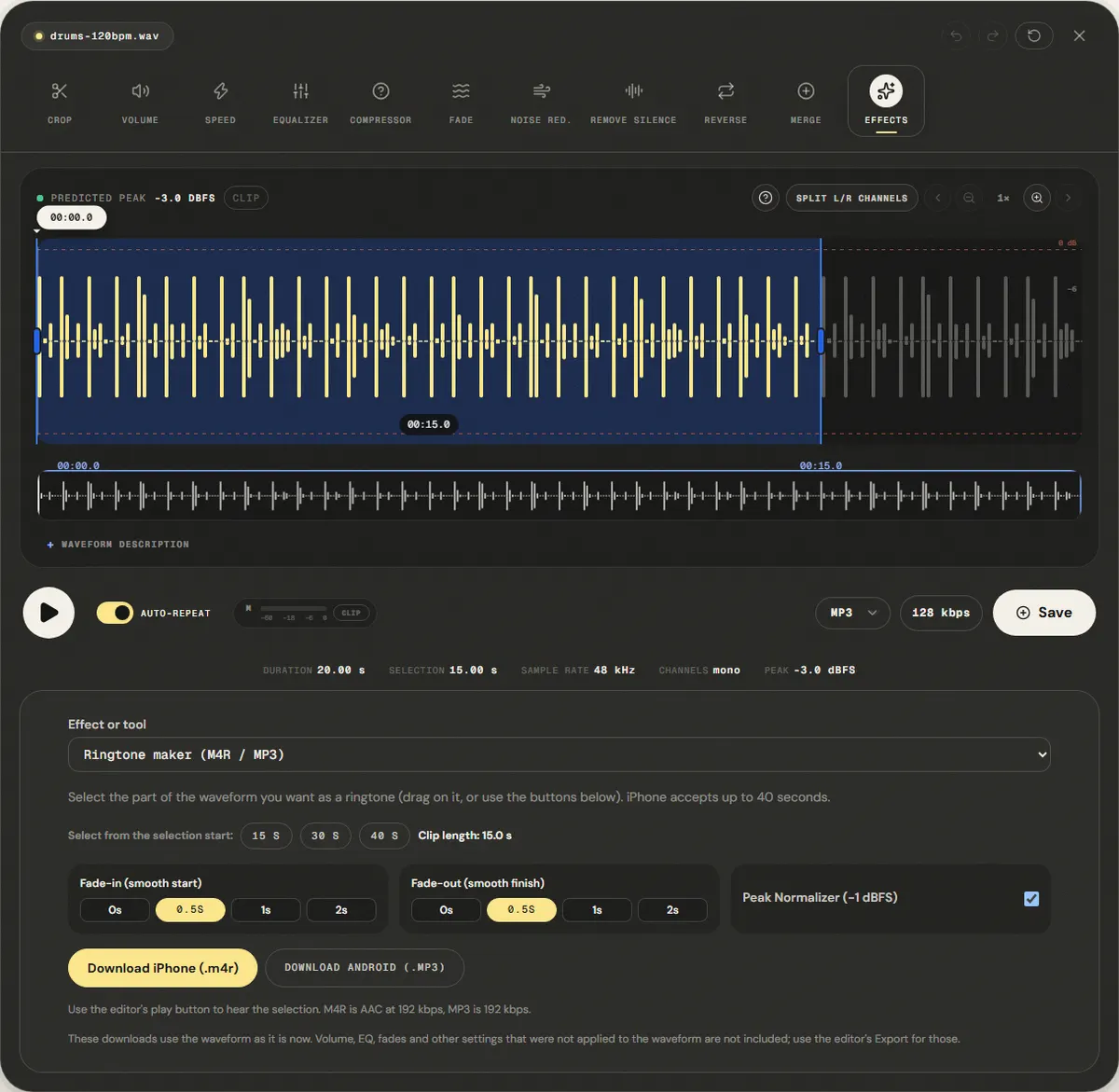
We opened a 20-second drum loop, pressed the 15 s button to select a 15-second clip on the waveform, kept the default fades and normalizer, and downloaded both files.
The Android MP3 is 360.6 KB, what 192 kbps for 15 s predicts (360.0 KB). The iPhone M4R is 224.6 KB: the AAC encoder needed fewer bits than its 192 kbps target for this simple loop.
The M4R opens as an MPEG-4 file and stays under the 40-second limit, but we have not tested installing it on an iPhone in this run.
| Measured | Format | Size |
|---|---|---|
| iPhone (.m4r) | AAC | 224.6 KB |
| Android (.mp3) | 192 kbps | 360.6 KB |
Download the reference file (WAV)The reference files are synthesized by this site (speech-like and music-like signals), so anyone can repeat the test. Measured on in the editor's ringtone mode. How we measure
( Field notes )
Mobile audio cropping and ringtone formats
Learn iOS 40s duration constraints, M4R AAC encoding, and loudspeaker normalization.
- ( 01 ) · 8 min read
How to Make a Custom Ringtone: iOS M4R vs Android MP3, Trimming & Audio Physics
Read - ( 02 ) · 13 min read
How to Cut Audio Without Clicks: Boundaries, Zoom and Microfades
Read - ( 03 ) · 11 min read
MP3, WAV, FLAC, AAC: Which Audio Format Should You Use?
Read