Audio-Editor

ITU-R BS.1770-4 · EBU R128 · 100% in-browser

LUFS meter online

Measure integrated LUFS, short-term and momentary loudness, loudness range (LRA), and true peak in your browser. Fast analysis with zero audio uploads.

Choose an audio file

or drop an audio file here

MP3 · WAV · M4A · FLAC · OGG

( Step by step )

How to check loudness online

  1. 1

    Load your audio file

    Select or drop your MP3, WAV, M4A, FLAC, or OGG file. Decoding happens in your browser without uploading to any remote server.

  2. 2

    Measure with ITU-R BS.1770-4

    The worker applies Stage 1 high-shelf K-filtering and Stage 2 RLB high-pass filtering, followed by −70 LUFS absolute gating and −10 LU relative gating.

  3. 3

    Inspect True Peak and LRA

    Verify whether 4x oversampled true peak stays below −1.0 dBTP to avoid codec distortion, and check Loudness Range (LRA) for dynamic consistency.

  4. 4

    Compare with streaming targets

    Check if your audio meets Spotify (−14 LUFS), Apple Podcasts (−16 LUFS), or EBU R128 (−23 LUFS), and send it to the normalizer if adjustments are needed.

( 01 )

What this LUFS meter measures — and what it does not

  • Calculates integrated loudness in full compliance with ITU-R BS.1770-4 dual-stage gating.
  • Measures True Peak with 4x polyphase sinc oversampling to uncover inter-sample peaks that sample peak meters miss.
  • Calculates Loudness Range (LRA) according to EBU Tech 3342 percentile distribution.
  • Runs 100% inside your browser Web Worker with zero network audio upload.
  • Measurement is diagnostic and does not alter, re-encode, or compress the original audio file.
( 02 )

Limitations and honest boundaries

  • Platform loudness policies evolve over time; always confirm the latest official creator delivery guidelines.
  • A file that meets integrated LUFS can still have overly compressed micro-dynamics or harsh transients.
  • Speech-heavy audio with long quiet intervals can show a wider LRA that is normal for narration.
  • Very long recordings (several hours) require sufficient device RAM to decode into Web Audio memory.

( 03 )

Privacy & local computing

Your audio file is decoded in browser RAM and processed in an isolated Web Worker thread. No audio data is uploaded to our servers or stored remotely. You can inspect your loudness metrics with total privacy.

( Questions? Answered )

Frequently asked questions about LUFS and loudness

What is LUFS and why does it matter?

LUFS (Loudness Units relative to Full Scale) is an international standard (ITU-R BS.1770) for measuring perceived audio loudness over time. Unlike peak meters that only show the single loudest spike, LUFS mimics how human ears perceive acoustic energy across different frequencies. Streaming platforms use LUFS to ensure listeners do not have to constantly adjust their volume between different songs or podcast episodes.

What is the difference between True Peak and Sample Peak?

Sample peak measures only the exact numbers stored in digital samples. When digital audio is converted back to analog waves or compressed into MP3/AAC, the waveform between samples can peak higher than any individual sample. True Peak uses 4x oversampling and sinc interpolation to calculate these inter-sample peaks. Keeping True Peak below −1.0 dBTP prevents harsh distortion during streaming codec playback.

What LUFS target should I aim for on Spotify, YouTube, and podcasts?

For Spotify, YouTube, and Amazon Music, aim for −14.0 LUFS integrated with True Peak below −1.0 dBTP. For podcasts and spoken audio (Apple Podcasts), the industry recommendation is −16.0 LUFS for stereo (−19.0 LUFS for mono) with −1.0 dBTP True Peak. For European broadcast television, EBU R128 requires exactly −23.0 LUFS (±0.5 LU).

What is Loudness Range (LRA)?

Loudness Range (LRA), defined by EBU Tech 3342, measures the dynamic variation between soft passages and loud crescendos across your track in Loudness Units (LU). Classical music and film scores typically have high LRA (10–20 LU), whereas pop music, commercials, and podcasts usually have narrower LRA (3–7 LU) so voice remains clear in noisy environments.

Does this online meter upload my audio to a server?

No. The meter processes your file completely inside your browser using the Web Audio API and a local Web Worker. Audio samples never cross the network or touch any external server.

( Next step )

Need to normalize your loudness?

Adjust your audio level to exact LUFS targets with one click in our browser normalizer.

Open Audio Normalizer

( Practical guide )

Reading a loudness measurement

Integrated LUFS is the average loudness of the whole file, weighted the way hearing works and ignoring silence (the ITU-R BS.1770 gate). Loudness range (LRA, in LU) says how much that loudness moves between quiet and loud passages. True peak (dBTP) estimates the highest point the waveform reaches between samples, which is what clips after MP3 or AAC encoding. The meter reads all three without changing the file.

Common targets (check each platform's current specification)

Spotify, YouTubeAbout −14 LUFS integrated, true peak at or below −1 dBTP
Podcasts (Apple and AES recommendation)−16 LUFS for stereo, true peak at or below −1 dBTP
TV and radio in Europe (EBU R128)−23 LUFS
Music master for your own useNo fixed target; streaming services turn louder files down

Worked example: a podcast episode that measures −21 LUFS

  1. The meter shows −21 LUFS integrated and a true peak of −4 dBTP: 5 LU below the −16 LUFS podcast target.
  2. Raising 5 dB would push the true peak to +1 dBTP, over full scale, so a plain gain change is not enough.
  3. Open the file in the editor, apply light compression to tame the peaks, then use the volume tool's −16 LUFS preset with the −1 dBTP ceiling.
  4. Measure the exported file again to confirm both numbers.

Loudness and true peak are separate checks: hitting the LUFS target is only safe if the peak still has room.

Limits

  • Platform targets change; the values above are references, not guarantees of acceptance.
  • True peak is an estimate from oversampling; dedicated meters can differ by a few tenths of a dB.
  • Very short files (a few seconds) give unstable integrated and LRA readings, because the gate needs enough material.

( Measured on a reference file )

A calibration tone with a known loudness

EBU Tech 3341 gives known answers for loudness meters. A 1 kHz sine at −20 dBFS on one channel should read −23.0 LUFS integrated and −20.0 dBTP true peak. We generated that tone (10 s) and measured it here, then measured our 6-second music reference.

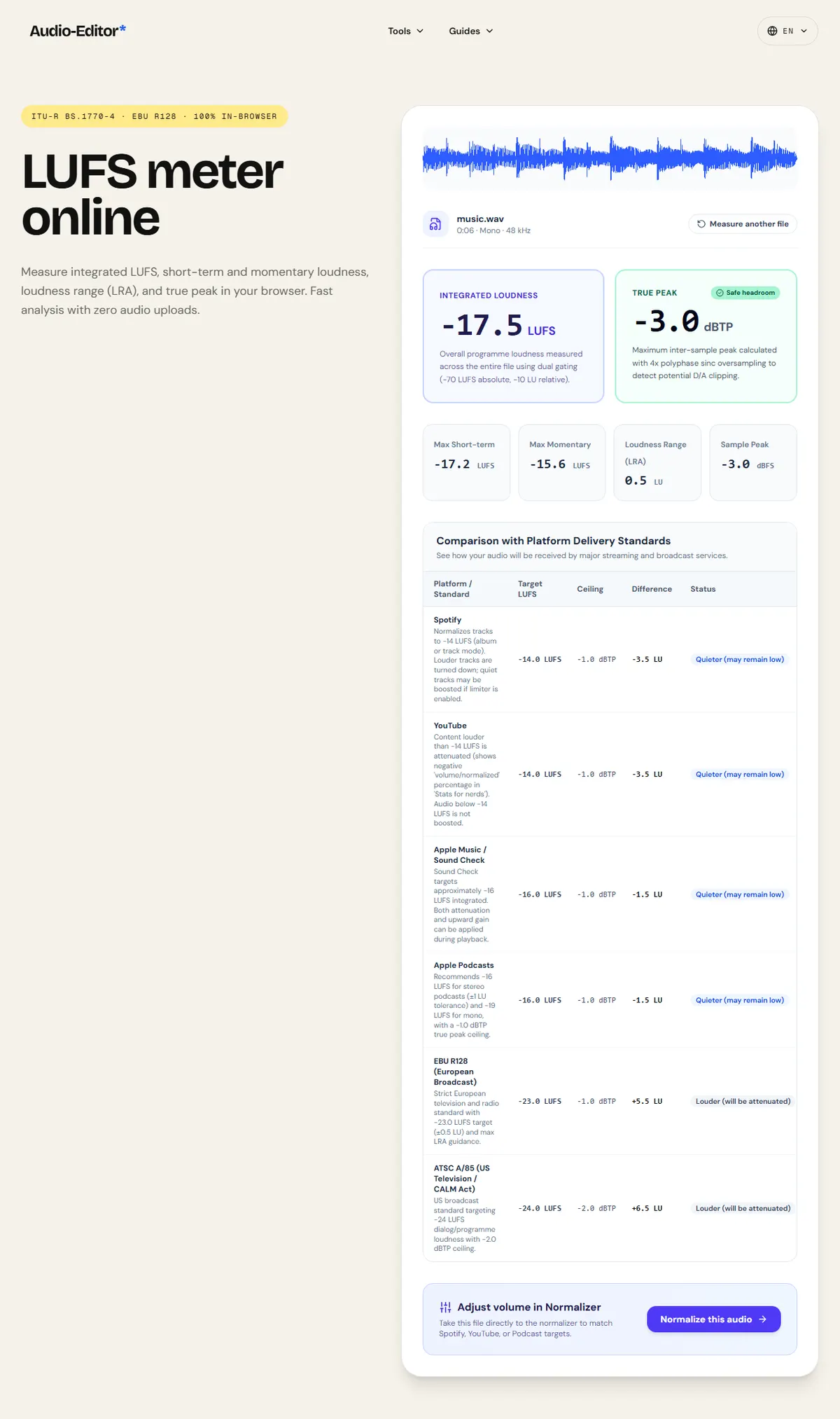
The meter read -23.0 LUFS and -20.0 dBTP on the calibration tone, matching the expected values to the tenth. The music reference measured -17.5 LUFS with a true peak of -3.0 dBTP.

Loudness range needs time: the 6-second music clip reads 0.5 LU, which says little. Measure whole episodes or songs for a meaningful LRA.

Results of the test
MeasuredExpected (EBU)Measured here
Integrated loudness, 1 kHz at −20 dBFS-23.0 LUFS-23.0 LUFS
True peak, same tone-20.0 dBTP-20.0 dBTP
LUFS meter showing integrated loudness, true peak and loudness range

Download the reference file (WAV)The reference files are synthesized by this site (speech-like and music-like signals), so anyone can repeat the test. Measured on on this page. How we measure