Dynamic Vocal De-Esser · Adaptive Sidechain Sibilance Tamer
Online De-Esser — Soften Harsh S Sounds & Vocal Sibilance
Soften piercing vocal sibilance ('s', 'z', 'sh') and harsh high frequencies directly in your browser. Uses an adaptive sidechain bandpass detector with fast dynamic gain reduction to tame strident consonants without dulling speech air, clarity, or presence.
The file opens in the full editor, on this tool: waveform, selection, before/after preview, undo and export.
( How it works )
How dynamic vocal de-essing works
Sidechain frequency isolation
A surgical 2nd-order Biquad bandpass filter isolates the exact sibilance zone (5.5 kHz to 7.5 kHz) where air turbulence concentrates.
Fast envelope follower
Tracks the instantaneous ratio of high-frequency sibilant energy relative to wideband vocal body with a 1 ms attack and 30 ms release.
Selective dynamic attenuation
Applies negative gain strictly during the fraction of a second when an 'S' or 'Z' is pronounced, leaving vowels and consonants untouched.
Full vocal brilliance preservation
Because attenuation only occurs on sibilant bursts, 100% of the natural high-frequency openness ('air') and vocal warmth remain intact.
( Vocal Acoustics )
The physics of vocal sibilance and dynamic control
Acoustics of Fricative & Sibilant Consonants
High-Velocity Oral Air Turbulence
Sibilant phonemes ('s', 'z', 'sh', 'ch') are produced by forcing exhaled air through a narrow channel formed between the tongue blade and alveolar ridge. The resulting turbulent jet strikes the sharp edges of the front teeth, creating high-energy acoustic noise centered between 4.5 kHz and 8.5 kHz.
The Condenser Microphone Proximity Trap
Presence Boosts and Capsule Resonances
Most consumer USB and studio condenser microphones feature an intentional +3 to +6 dB presence boost in the 6 kHz to 10 kHz range to simulate 'clarity'. When speakers get close to the capsule, this boost magnifies natural sibilance into painful, abrasive spikes that distort on smartphones and earbuds.
Why Static Equalizers Ruin Vocal Tone
Muffled Speech vs Dynamic Excision
Cutting treble with an equalizer reduces high frequencies across the entire recording. This removes the overtone 'air' from vowels and leaves the speaker sounding muffled, dark, and lifeless. A dynamic de-esser activates only during the ~30 ms window of the sibilant consonant, releasing instantly for the next vowel.
Preventing the 'Lisp' Effect (Ceceio)
Calibrated Attenuation Ceilings
Over-aggressive de-essing attenuates consonants so severely that an 'S' turns into 'TH', causing an unnatural lisping effect. Our algorithm limits maximum dynamic attenuation to −18 dB and maintains proportional ratio control to ensure speech remains crisp and authentic.
( Knowledge Base )
Frequently Asked Questions About Vocal De-Essing
What is a de-esser and why is it essential for voice recordings?↓
A de-esser is a specialized dynamic frequency compressor designed to attenuate harsh, piercing 'S', 'Z', and 'SH' sounds in vocal tracks. It prevents listener ear fatigue on headphones and ensures podcast and video speech sounds smooth and professional.
Can I just use an equalizer instead of a de-esser?↓
No. A standard equalizer cuts high frequencies permanently across the entire track, making the voice sound muddy, dark, and distant. A dynamic de-esser cuts frequencies only for the 20 to 50 milliseconds when the harsh consonant is uttered, preserving 100% of vocal brightness the rest of the time.
What is the difference between male and female vocal profiles?↓
Due to vocal tract geometry and anatomical pitch differences, male sibilance typically peaks around 5.0 kHz to 6.2 kHz, whereas female sibilance is located higher, typically between 6.5 kHz and 8.0 kHz. Selecting the appropriate profile focuses the sidechain detector right on the problem frequency.
Will setting intensity too high give me a lisp?↓
Yes. If you set de-essing above 85–90%, the 'S' sound will be attenuated so much that it resembles a 'TH' sound (known in audio engineering as lisping). For standard podcast and speech editing, we recommend the 50% Balanced preset.
How do I reduce sibilance when recording into a microphone?↓
Position the microphone slightly above or to the side of your mouth (aimed at your nose or cheek rather than straight at your teeth), use a dual-layer nylon pop filter, and maintain a consistent distance of at least 15 cm (6 inches) from the capsule.
Is my audio uploaded or processed on external servers?↓
No. All Biquad sidechain filtering, dynamic gain envelopes, and audio encoding are executed locally inside your browser using the Web Audio API. Your recordings are 100% private and never leave your computer.
( Practical guide )
Taming harsh S sounds without a lisp
Sibilance is the hiss of S, SH, Z and soft C, concentrated between about 4 and 9 kHz. Bright USB microphones, close placement and heavy compression all make it stand out. A de-esser listens only to that band and turns it down only when it crosses a threshold, so the rest of the voice, and the S sounds that were already fine, are left alone. The skill is in reducing enough that S stops stinging but not so much that it turns into TH.
Which preset for which voice
| Mostly fine, a few sharp S sounds | Gentle (25%) |
|---|---|
| Typical podcast voice, noticeable S on headphones | Balanced (50%), the default |
| Bright USB microphone, S that hurts at normal volume | Intense (80%), centered at 6.5 kHz |
| Deep voice, or a higher voice whose S sits above 7 kHz | The voice profiles: 5.5 kHz for deep voices, 7.2 kHz for higher ones |
Worked example: de-essing before compression
- Open the raw voice track and apply the de-esser first, with Balanced.
- Listen to a sentence full of S sounds, on headphones, at the volume your audience will use.
- If S now sounds dull or lispy, undo and use Gentle. If it still stings, try the voice profile that matches the speaker.
- Only then apply compression and normalization. A compressor raises quiet parts, and S sounds rise with them; removing the excess first keeps them in check.
On our reference voice with exaggerated S bursts, Balanced lowered the sibilant band by 3.2 dB while the vowels kept their level.
Limits
- Strong settings make S sound lispy. Always compare before and after with undo.
- Cymbals and hi-hats live in the same band. On a full mix, de-ess the voice track alone if you have it.
- It reduces sibilance; it does not fix a microphone that is harsh at every frequency. An EQ cut may be the better tool for that.
( Measured on a reference file )
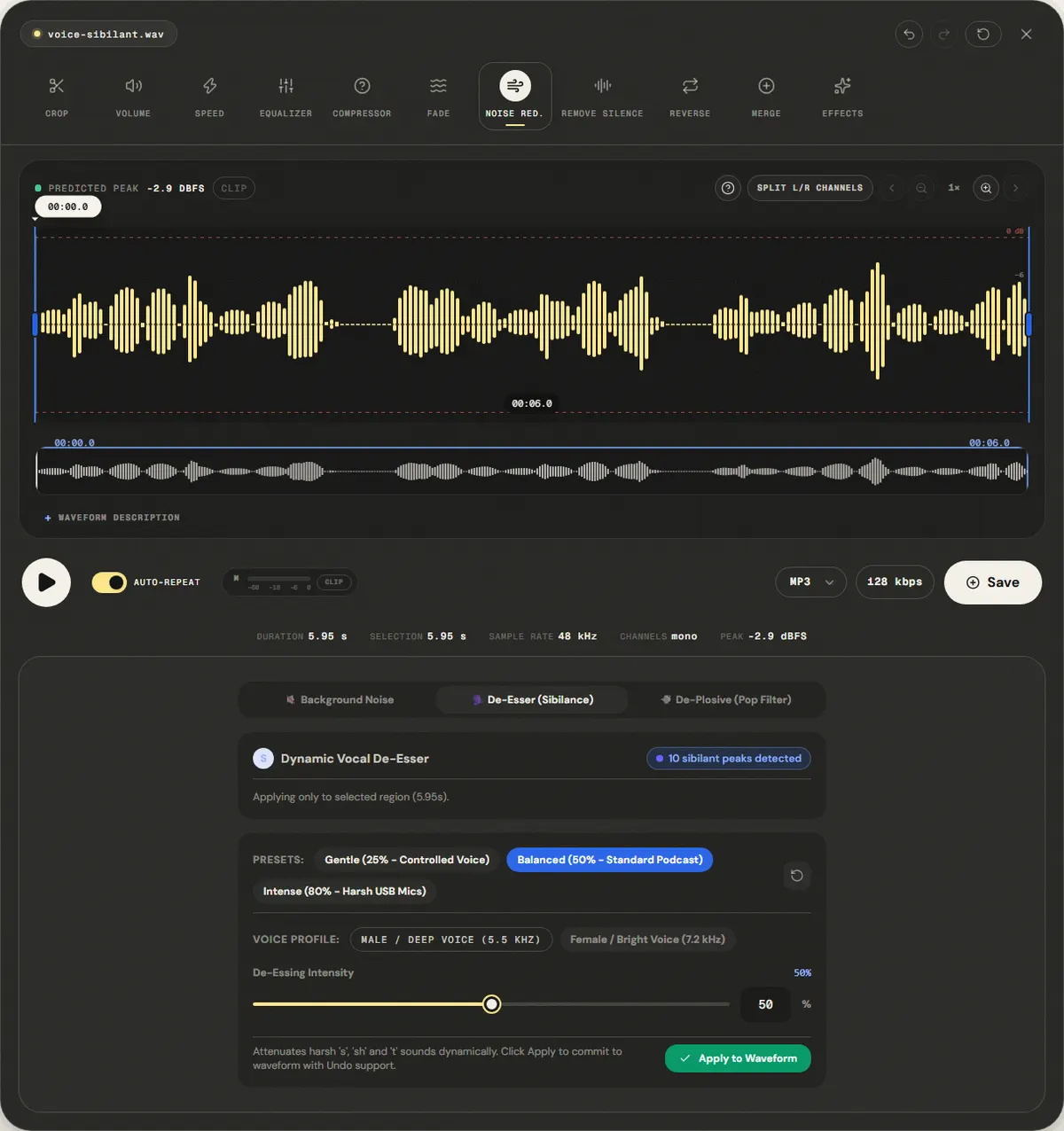
Harsh S sounds in a voice, at the default setting
We added nine bursts of noise centered at 6.5 kHz, about the length of an S, to the reference voice. The page opened the editor on the De-Esser tab; we clicked Apply to Waveform with the default Balanced preset and the 5.5 kHz voice profile.
Energy in the 5–9 kHz sibilance band fell 3.2 dB, while the 300 Hz–3.4 kHz speech band changed +0.2 dB.
Balanced is deliberately moderate, so the S sounds get softer without a lisp. For harsher recordings, the Intense preset or the 7.2 kHz profile reduce more; listen for a lisp after each change.
| Measured | Before | After |
|---|---|---|
| Sibilance band 5–9 kHz | 26.8 dB | 23.6 dB |
| Speech band 300 Hz–3.4 kHz | 34.7 dB | 34.9 dB |
Download the reference file (WAV)The reference files are synthesized by this site (speech-like and music-like signals), so anyone can repeat the test. Measured on in this editor, exporting WAV. How we measure
( Field notes )
Sibilance and vocal frequency balance
Why high frequencies become piercing and how sidechain dynamic reduction tames them.
- ( 01 ) · 8 min read
How to Reduce Sibilance in Audio: Taming Harsh S Sounds with a De-Esser
Read - ( 02 ) · 15 min read
How to EQ Voice, Music and Podcasts Online
Read - ( 03 ) · 8 min read
How to Remove Plosives and Mic Pops from Audio: Physics, Pop Filters & Dynamic De-Plosive
Read