Batch Track Slicing · Silence Gap Detection & ZIP Archive Export
Online Audio Splitter — Split MP3 & WAV by Silence or Duration Free
Divide large audio recordings, podcasts, and music albums into clean individual tracks. Automatically detect silent pauses, split into equal duration chunks, and download all parts in a single ZIP file without re-encoding.
The file opens in the full editor, on this tool: waveform, selection, before/after preview, undo and export.
Silence & Time Segmentation
Detect natural speaker pauses, song gaps, or automatically slice long webinars into exact equal-length chapters with zero audio leakage.
Instant ZIP Download
Package all cut segments into a single uncompressed PKWARE ZIP archive generated on-the-fly in browser memory for one-click downloading.
Anti-Click Microfading
Every segment boundary features a 5-millisecond raised-cosine fade, eliminating digital clicks caused by DC offsets and non-zero-crossings.
Acoustic Silence Detection: RMS Energy Tracking & Gating Windows
Automated audio splitting relies on short-time root-mean-square (RMS) energy analysis across overlapping time frames (typically 20 ms to 40 ms). In real-world audio recordings, true absolute digital silence (-∞ dBFS) rarely exists due to ambient room tone, analog preamp thermal noise, and microphone self-noise.
Our algorithm tracks running RMS power and evaluates candidate silence regions against two mathematical constraints: an amplitude threshold (typically -35 dBFS to -50 dBFS) and a temporal persistence threshold (minimum duration, e.g. 0.5s to 2.0s). The split point is calculated precisely at the geometric midpoint of the silence window, ensuring natural breath room before the next transient begins.
Anti-Click Edge Microfading at Cut Boundaries
Arbitrarily cutting digital audio at a non-zero sample value creates an instantaneous mathematical step function from that sample voltage directly to 0 V. When played back through transducers, this discontinuity generates broad-spectrum high-frequency energy perceived by human hearing as an irritating pop or tick.
To guarantee pristine audio quality, every segment produced by our splitting engine undergoes a symmetrical 5 ms boundary microfade. The microfade smoothly scales the initial and final 220 samples (at 44.1 kHz) to zero without altering musical tempo, speech cadence, or perceived loudness.
High-Performance In-Memory ZIP Packaging (STORE Method)
Standard file compression algorithms like DEFLATE or LZMA provide negligible space savings on modern audio files (MP3, AAC, FLAC, and OGG already utilize specialized psychoacoustic lossy or linear predictive lossless entropy encoding). Re-compressing 20 audio tracks with DEFLATE consumes extensive CPU cycles and battery power for zero file size benefit.
Our browser engine assembles a compliant PKWARE ZIP archive using the STORE specification (Method 0, no compression). It calculates 32-bit CRC checksums directly across the Float32 and PCM binary buffers, generating a downloadable ZIP package in milliseconds with 100% data integrity.
( Workflow )
How to Split Audio Files in 4 Steps
Upload Your File
Drop a long recording (podcast, live album, lecture). It opens in the full editor with the split panel selected.
Select Splitting Method
Choose between Equal Duration (e.g. every 10 min) or Automatic Silence Detection (splits at pauses between songs).
Review and Audition Segments
Click Show on a part to select it on the waveform, then play it or zoom in on the cut point.
Download Single Tracks or All as ZIP
Download individual tracks immediately or click Download All Tracks (.zip) to bundle all slices into an organized ZIP archive.
( Knowledge Base )
Frequently Asked Questions About Audio Splitting
How does the automatic silence detector know where to split?↓
The detector calculates the RMS (Root Mean Square) energy across continuous 25 ms windows. When audio levels drop below your specified threshold (default -40 dBFS) for longer than the minimum silence duration (default 0.6 seconds), the algorithm identifies a valid pause. The split marker is positioned right in the middle of this pause to keep natural silence padding on both sides.
Will splitting audio degrade its original sound quality?↓
No. The parts are cut at sample positions and written as 16-bit WAV, so no lossy compression is added. Two things change: a 5 ms fade at each edge to prevent clicks, and sources above 16 bits are reduced to 16-bit.
What is the maximum file size and track count?↓
Files up to 256 MB are accepted, and there is no fixed limit on the number of parts. The binding limit is length: the editor keeps the decoded audio in memory, so a typical computer opens about 11 to 12 minutes of stereo audio (about 23 in Chrome or Edge with 8 GB of memory or more, and about twice that in mono). Split longer recordings in a desktop editor first, or convert them to mono.
Are my audio files uploaded to any server?↓
No. The entire audio decoding, waveform segmentation, boundary microfading, and ZIP archive packaging run 100% locally in your web browser. Your recordings never leave your device, ensuring complete privacy.
( Practical guide )
Splitting by time or by silence
There are two ways to cut a long recording into parts. Fixed length cuts every N minutes no matter what is happening, which is predictable but can land in the middle of a word. Silence detection looks for pauses quieter than a threshold and cuts inside them, which follows the content but depends on how quiet the pauses really are. Both add 5 ms fades at each cut so the parts do not click.
Which mode for which recording
| Upload limit on a site or messaging app | Fixed length: 1, 3, 5, 10, 15 or 30 minutes |
|---|---|
| Album recorded as one file, with gaps between songs | Silence, minimum pause 1 or 1.5 s, so quiet passages inside a song are not cut |
| Voice phrases, word lists, audiobook sentences | Silence, minimum pause 0.4 or 0.6 s |
| Noisy recording (fan, street, hiss) | Raise the threshold toward −30 or −25 dBFS, or remove the noise first in the editor |
Worked example: a 45-minute lecture for a 25 MB email limit
- A mono WAV at 44.1 kHz is about 5.3 MB per minute, so 45 minutes is about 238 MB.
- Parts are exported as WAV, so to fit 25 MB each one needs to be under about 4.5 minutes: choose 3 minutes, which gives 15 parts.
- If fewer parts matter more, export the whole lecture as MP3 at 64 kbps first (about 0.5 MB a minute, 22 MB total) and skip the split.
- Use Show on any part to select it on the waveform and listen before downloading the ZIP.
The arithmetic decides the mode: splitting is for keeping full quality, compression is for getting under a size limit with fewer files.
Limits
- Parts are 16-bit WAV only. For MP3 parts, open each part in the editor and export it.
- Silence detection cuts inside the pause, so the silence is shared between neighbouring parts, not removed.
- The threshold goes from −55 to −25 dBFS. A recording whose quietest moments are louder than −25 dBFS has no pause the detector can use.
- Part names are numbered, not taken from song titles or speech.
( Measured on a reference file )
Three phrases split at the pauses
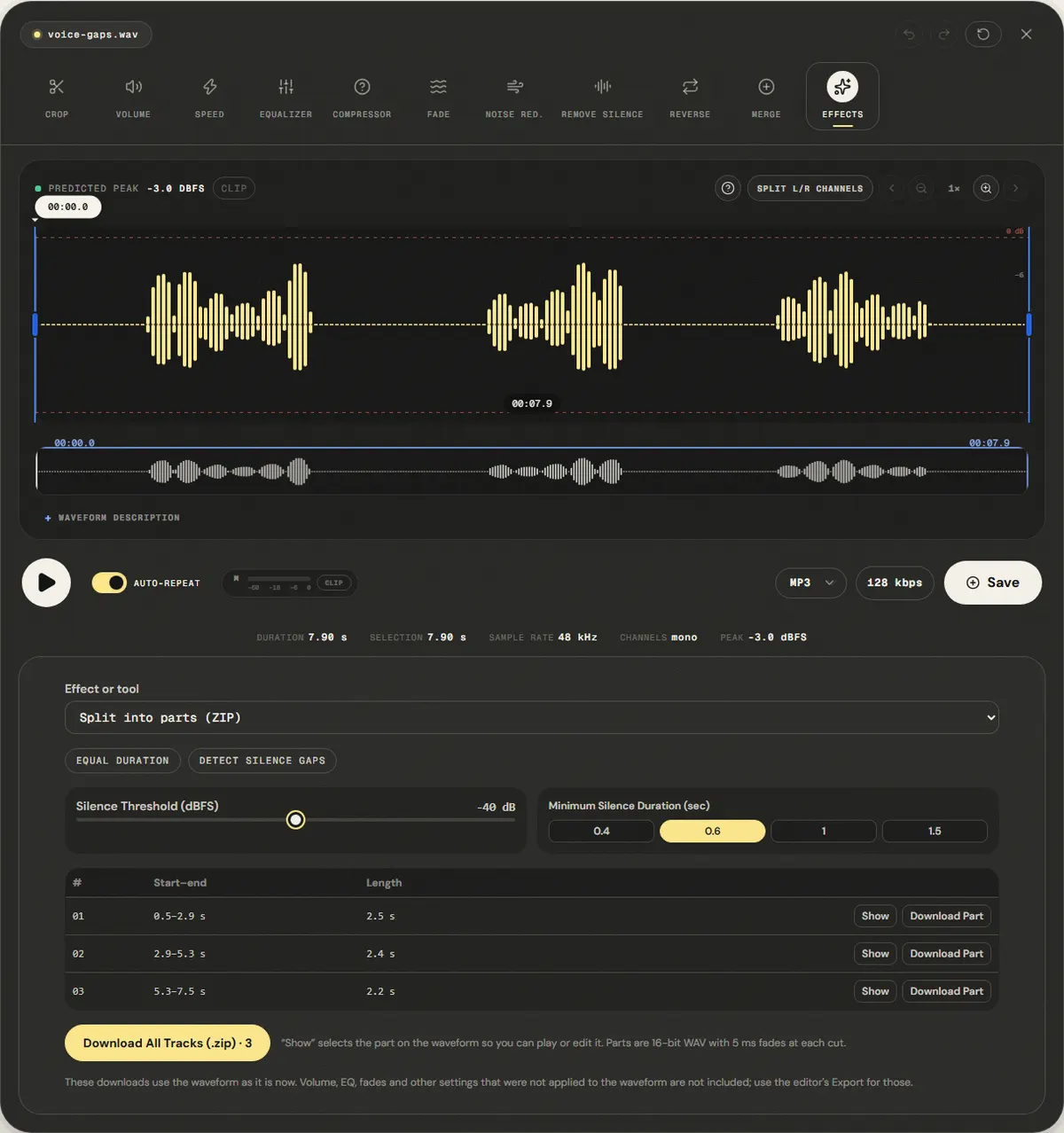
Our reference has three spoken phrases separated by pauses of 1.2 to 1.4 seconds, with silence at both ends. We chose Detect Silence Gaps with the defaults (−40 dBFS, 0.6 s minimum pause).
The panel found 3 parts, one per phrase, and the ZIP with the three WAV files is 677.3 KB.
Each cut falls inside a pause, so the silence is shared between neighbouring parts rather than removed. Noisy recordings may have no pause below −40 dBFS; raise the threshold for them.
| Measured | Start–end | Length |
|---|---|---|
| Part 1 | 0.5–2.9 s | 2.5 s |
| Part 2 | 2.9–5.3 s | 2.4 s |
| Part 3 | 5.3–7.5 s | 2.2 s |
Download the reference file (WAV)The reference files are synthesized by this site (speech-like and music-like signals), so anyone can repeat the test. Measured on in the editor's split mode. How we measure
( Field notes )
Audio segmentation and chapter slicing
Splitting audio by natural silence pauses or equal duration chunks into ZIP archives.
- ( 01 ) · 8 min read
How to Split Audio Files: Silence Detection, Equal Chunks & Lossless Export
Read - ( 02 ) · 13 min read
How to Cut Audio Without Clicks: Boundaries, Zoom and Microfades
Read - ( 03 ) · 11 min read
MP3, WAV, FLAC, AAC: Which Audio Format Should You Use?
Read