Convolution Reverb · Studio Acoustics & Stereo Echo DSP
Add Reverb to Audio Online — Free Convolution Space & Echo Effect
Transform flat, dry vocals, instruments, and podcast voiceovers into lush, three-dimensional acoustic spaces. Features procedural synthetic impulse response convolution with RT60 decay control, frequency damping, pre-delay reflections, and stereo feedback echo directly in your browser.
The file opens in the full editor, on this tool: waveform, selection, before/after preview, undo and export.
( How it works )
How procedural convolution reverb and acoustic spaces work
Synthetic impulse response (IR) mathematical generation
Computes a high-resolution stereo impulse response using exponential decay curves h(t) = w(t) * e^(-6.908 * t / RT60) that simulate the exact density of real physical wall reflections.
Progressive air absorption and boundary damping
Filters early and late reflections through a dynamic low-pass smoothing function, replicating the natural physics where high frequencies lose energy faster in ambient air and soft furnishings.
Stereophonic spatial decorrelation
Generates independent, phase-decorrelated reflection patterns for the Left and Right channels, expanding the stereo width into a natural immersive field.
Multi-threaded offline convolution and tail extension
Executes mathematical convolution faster than real time via hardware-accelerated Web Audio threads, automatically extending track duration so the natural reverb ring-out never gets cut off.
( Room Acoustics & RT60 )
The physics of room acoustics, Sabine's formula, and convolution DSP
Sabine's Reverberation Law and RT60
The 60 dB Decay Standard
In architectural acoustics, RT60 defines the time required for acoustic energy to drop by 60 decibels (one millionth of its original sound power) after sound generation stops. Formulated by Wallace Clement Sabine (RT60 = 0.161 * V / A), decay duration is directly proportional to room volume and inversely proportional to total surface absorption.
Early Reflections vs Late Diffuse Reverberation
Direct Sound, Pre-Delay, and Acoustic Density
When a sound is emitted, the ear first receives the direct wave, followed 5–40 ms later by discrete 'early reflections' bouncing off nearby boundaries. As sound waves continue reflecting hundreds of times per second, individual echoes merge into a continuous, statistically random 'late diffuse field' that gives rooms their acoustic warmth.
Acoustic Air Damping and High-Frequency Loss
Why Large Halls Sound Darker and Warmer
Due to molecular thermal relaxation in nitrogen and oxygen molecules, high-frequency sound waves (>5 kHz) dissipate significantly faster across space than low-frequency waves. Our progressive frequency damping model simulates this acoustic absorption so reverb tails settle naturally without piercing hiss.
Convolution vs Algorithmic Feedback Delay Networks
Zero Phase Ringing and True Architectural Depth
While primitive algorithmic reverbs chain comb and allpass filters (which can sound metallic or ring on percussive attacks), synthetic convolution models an infinite series of reflection particles simultaneously, providing natural, smooth reverberation across speech, drums, and orchestral music.
Automatic Tail Length Extension
Eliminating the Hard Cut Artifact
When adding reverb, the sound must ring out after the music ends. Our processor dynamically recalculates the output buffer length by adding the full RT60 decay time to the original song length, ensuring that final vocal notes and cymbal tails fade gracefully into silence.
100% Private In-Browser Web Audio Execution
Zero Cloud Rendering Queues
All fast Fourier transforms (FFT) and time-domain convolution calculations run in local browser Web Audio threads. Your audio files, voice recordings, and music projects remain confidential and never leave your machine.
( Knowledge Base )
Frequently asked questions about adding reverb and room acoustics
What is the difference between room reverb, plate reverb, and hall reverb?↓
Room reverb simulates small studio spaces (0.5s to 1s decay) providing natural presence without muddying vocals. Plate reverb emulates vintage 1960s mechanical steel plates with bright, dense reflections ideal for pop singing. Hall and Cathedral reverbs simulate vast concert venues (2.5s to 4.5s decay) creating lush, majestic ambient washes.
What does the 'Pre-Delay' setting do?↓
Pre-delay adds a short gap of silence (usually 10 to 40 milliseconds) between the dry vocal and the onset of the reverb reflections. This keeps speech and lyrics clear and upfront in the mix by letting initial consonants speak clearly before the room reflections wash in.
Why does the exported audio file become slightly longer than the original?↓
When reverb is applied, the sound continues to echo and decay naturally after the final note finishes playing. Our processor automatically extends the audio duration by the reverb's RT60 decay time so that the tail fades smoothly into silence instead of being abruptly cut off.
How do I add an echo delay effect to my song?↓
Select the 'Stereo Echo & Ambient Reverb' preset, or manually increase the 'Echo Delay Time' slider to around 300–400 ms and adjust the 'Echo Feedback' slider to control the number of rhythmic repeats.
What is High-Frequency Damping and why does it matter?↓
In real physical spaces, air, carpet, and wood absorb high frequencies much faster than low frequencies. Damping attenuates harsh treble in the reverb tail, ensuring your reverb sounds warm and natural rather than shrill and metallic.
Can I download my audio in lossless WAV or MP3 format?↓
Yes. Once processing finishes, you can download studio-quality 16-bit PCM WAV for further editing, or encode directly to high-quality 256 kbps MP3 for listening on mobile devices or sharing online.
Are my audio files uploaded to an external server?↓
No. All procedural impulse response generation and convolution rendering run locally in your web browser via the Web Audio API. Your recordings are 100% private and never uploaded to any cloud server.
( Practical guide )
Picking a room: preset, amount, then size
Most reverb problems come from too much of it, not from the wrong kind. Start with the preset closest to the space you imagine, set the wet level so the reverb is barely noticed, and only then adjust the decay. The file grows by the decay time, up to 5 seconds, so the tail is never cut.
Which preset for which material
| Voice-over that sounds too dry | Small Room / Studio Booth (0.8 s) at a low wet level |
|---|---|
| Sung vocal or snare | Vintage Plate Reverb (1.6 s), bright |
| Piano, strings, acoustic guitar | Concert Hall (2.6 s, 25 ms pre-delay) |
| A 1950s vocal or a guitar slap | Rockabilly Slapback Delay: one 110 ms repeat |
Worked example: a dry voice for a video
- Choose Small Room / Studio Booth.
- Lower Reverb level (wet) to about 15% and preview a sentence with a pause after it.
- If words blur, add 20 ms of Pre-delay; if the tail sounds metallic, lower Damping to about 6 kHz.
- Apply to the whole file and listen to the last second: the tail should fade into silence.
The voice sounds like it was recorded in a small, quiet room instead of inside a closet, without sounding distant.
Limits
- The impulse is synthetic: smooth and convincing, but not a measured copy of a real hall.
- A mono file comes out in stereo, because the reverb differs slightly on each side.
- Reverb is added to everything selected at once; different instruments cannot get different rooms.
- It cannot remove reverb from a recording.
( Measured on a reference file )
Reverb on a dry voice: how long the tail rings
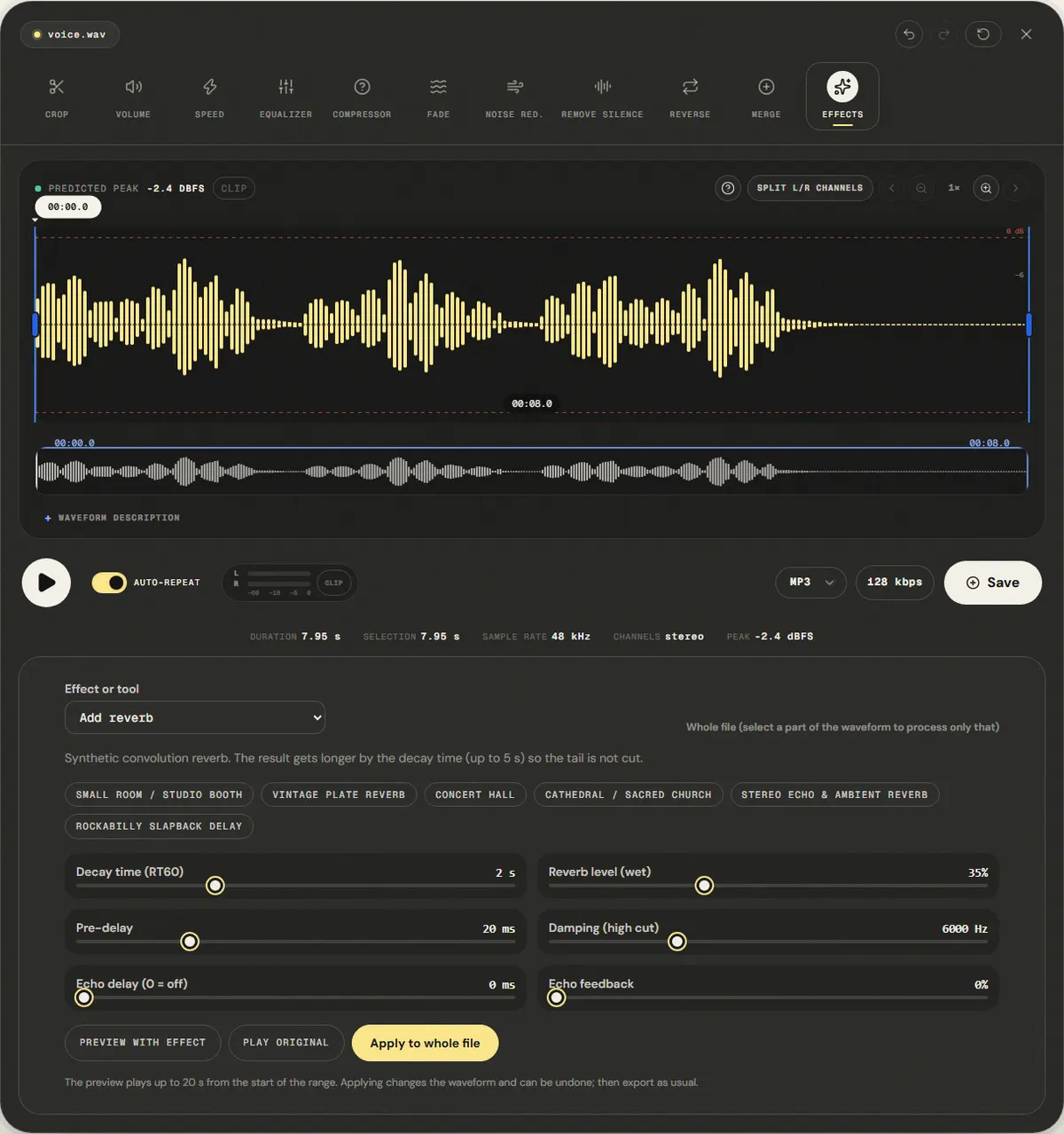
We applied the default reverb (2-second decay, 35% wet, 20 ms pre-delay) to the dry reference voice and exported WAV.
The file grew from 5.95 s to 7.95 s, the 2-second decay, so the tail is not cut. Sound above −60 dBFS now lasts until 7.16 s, 1.21 s past the last word. The mono voice came out in stereo, because the reverb is different on each side.
The peak rose to -2.9 dBFS because reflections add to the dry signal. With long decays and wet levels near 100%, check the peak before exporting.
| Measured | Before | After |
|---|---|---|
| Duration | 5.95 s | 7.95 s |
| Audible until (−60 dBFS) | 5.95 s | 7.16 s |
| Sample peak | -3.0 dBFS | -2.9 dBFS |
| Average level (RMS) | -17.7 dBFS | -18.8 dBFS |
Download the reference file (WAV)The reference files are synthesized by this site (speech-like and music-like signals), so anyone can repeat the test. Measured on in this editor, exporting WAV. How we measure
( Field notes )
Room acoustics and reverberation
How decay time, pre-delay and damping create space.
- ( 01 ) · 8 min read
What Is Reverb in Audio? Acoustics, RT60, Pre-Delay & Convolver Physics Explained
Read - ( 02 ) · 8 min read
How to Make Slowed + Reverb Audio: Physics, Resampling & Aesthetic Mixing Guide
Read - ( 03 ) · 15 min read
How to EQ Voice, Music and Podcasts Online
Read