Quick answer
Slowed + reverb grew online in the late 2010s, drawing on the slowed-down Slowed + reverb started as a YouTube and SoundCloud genre around 2017 and became a standard edit on TikTok and Reels.quot;chopped and screwedSlowed + reverb started as a YouTube and SoundCloud genre around 2017 and became a standard edit on TikTok and Reels.quot; style of 1990s Houston hip-hop, and became a standard edit on TikTok and Reels. It is simple to make, and just as simple to make badly. This guide covers what the effect is made of, why slowing a song changes its pitch, how to make one in the browser, what our test measured, and the rights question that comes with publishing it.
What a slowed + reverb edit is made of
Three changes, applied together:
- Slower playback, with pitch following. Like a record played at the wrong speed, the song gets longer and lower at the same time. At 0.85× every frequency is multiplied by 0.85, which is 2.81 semitones down: a song in A plays close to F♯.
- A long, wet reverb. Usually 2 to 5 seconds of decay, loud enough to fill every gap. It is what makes the edit sound dreamy and distant.
- A bass lift. Slowing moves the low end even lower, where small speakers lose it; a gentle boost around 180 Hz restores some weight.
The opposite edit, sped up or nightcore, uses the same three ingredients pointing the other way: faster, higher, brighter, with little reverb.
Why slowing down lowers the pitch
Pitch is how many times per second a sound wave repeats. Play the same wave more slowly and it repeats fewer times per second, so it sounds lower. Tape machines and turntables can only do it this way, and that coupled change is part of the slowed sound. The relationship is exact: semitones = 12 × log₂(speed). So 0.75× is about 5 semitones down, 1.25× about 3.9 up.
| Speed | Pitch change | A 3-minute song lasts |
|---|---|---|
| 0.75× (Super Slowed) | −4.98 semitones | 4:00 |
| 0.85× (Classic Slowed) | −2.81 semitones | 3:32 |
| 1.15× (Sped Up) | +2.42 semitones | 2:37 |
| 1.25× (Nightcore) | +3.86 semitones | 2:24 |
If you want the slower tempo without the lower pitch, tick Keep original pitch (time-stretch only). The editor then stretches the audio in time instead of resampling it. It sounds cleaner on speech, but less like the classic slowed edits, which rely on the pitch drop.
How to make a slowed + reverb edit, step by step
The Slowed + Reverb page opens the file in the editor with Slowed + reverb selected in the Effect or tool menu. It runs in your browser.
Step 1: Pick a preset
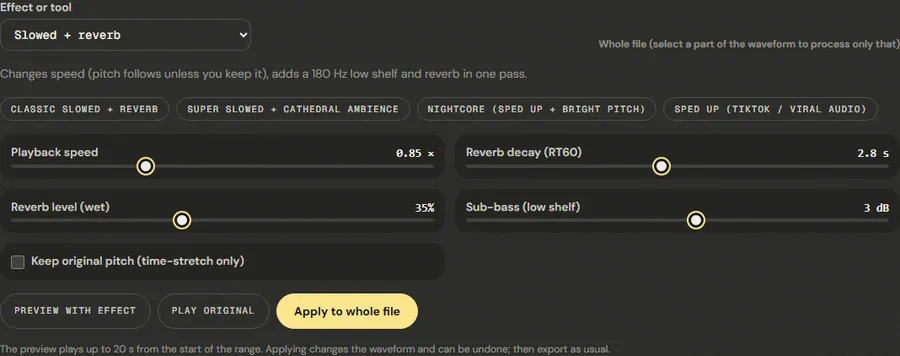
- Classic Slowed + Reverb: 0.85×, 2.8 s, 35% wet, +3 dB. The default.
- Super Slowed + Cathedral Ambience: 0.75×, 4.5 s, 45% wet, +4.5 dB. Very slow and very wet.
- Nightcore (Sped Up + Bright Pitch): 1.25×, short 1.2 s reverb at 20%.
- Sped Up (TikTok / Viral Audio): 1.15×, a light 0.9 s room, no bass boost.
Step 2: Adjust to the song
Playback speed goes from 0.6× to 1.4×; Reverb decay (RT60) from 0.5 to 5.5 s; Reverb level (wet) from 5% to 80%; Sub-bass (low shelf) from −3 to +8 dB. Songs with a dense mix get muddy with a lot of reverb: lower the wet level before shortening the decay. Songs already heavy in bass need 0 dB of sub-bass, not more.
Step 3: Preview the chorus, then apply
Select the chorus and use Preview with effect; it is where the reverb builds up most. Then deselect, click Apply to whole file, and listen to the end, where the tail should fade out cleanly. The file gets longer by the speed change and the reverb tail.
Step 4: Check the level before exporting
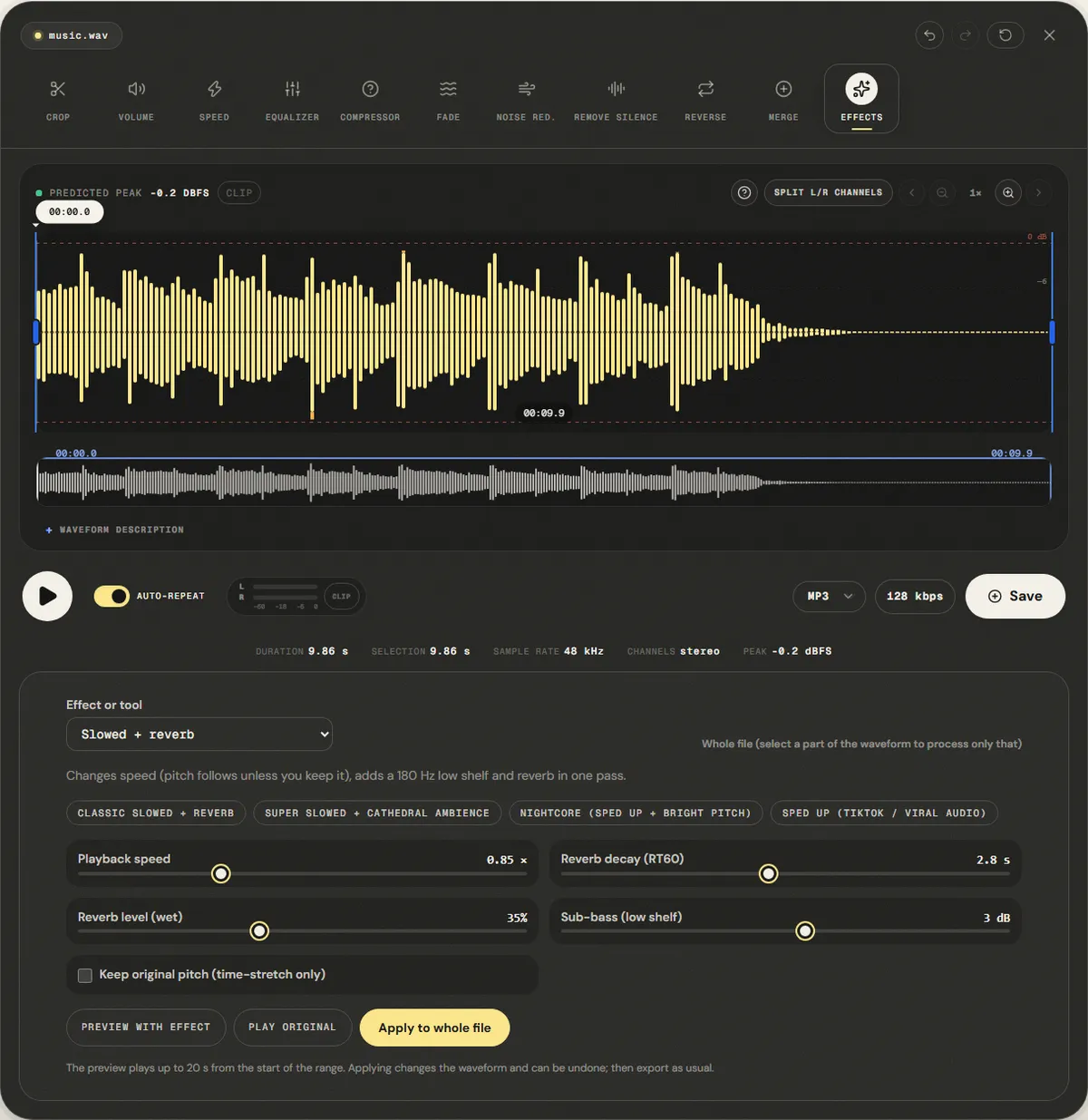
The bass boost and the reverb both add level. If the peak meter shows red, run the normalizer or lower the volume before you export, or the loudest beats will clip.
Finishing the edit for a short video
Most slowed edits end up as a 15 to 60 second clip. A few steps make the difference between a rough export and one that sounds finished:
- Choose the section after applying the effect. Timings change with the speed, so select the chorus in the slowed version, not in the original.
- Start on a beat and fade out the end. A 0.5 to 1 second fade-in avoids a click at the start; a 2 to 3 second fade-out lets the reverb tail close the clip instead of a hard cut.
- Set the loudness. Platforms adjust playback volume toward a target; YouTube is commonly measured at about −14 LUFS. Measure with the LUFS meter and normalize to around −14 LUFS so the clip is not turned down, or left quiet, by the platform.
- Export once. Export the final clip as MP3 at 192 kbps or higher, or WAV if the video editor will compress it again.
Keep the original file. If you want a second version at a different speed, start again from the original rather than slowing the slowed version, which would stack two rounds of resampling and reverb.
Measured example
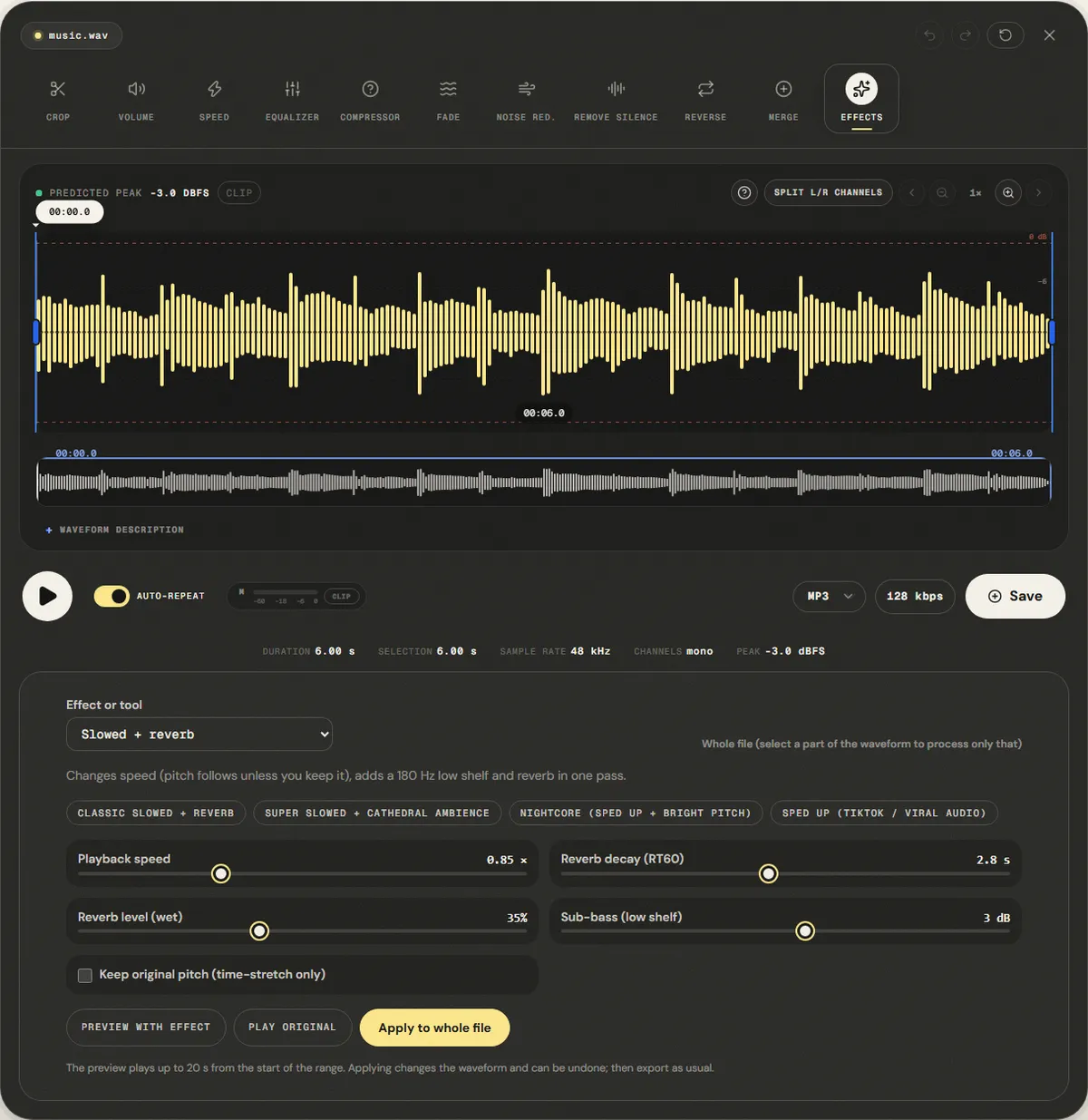
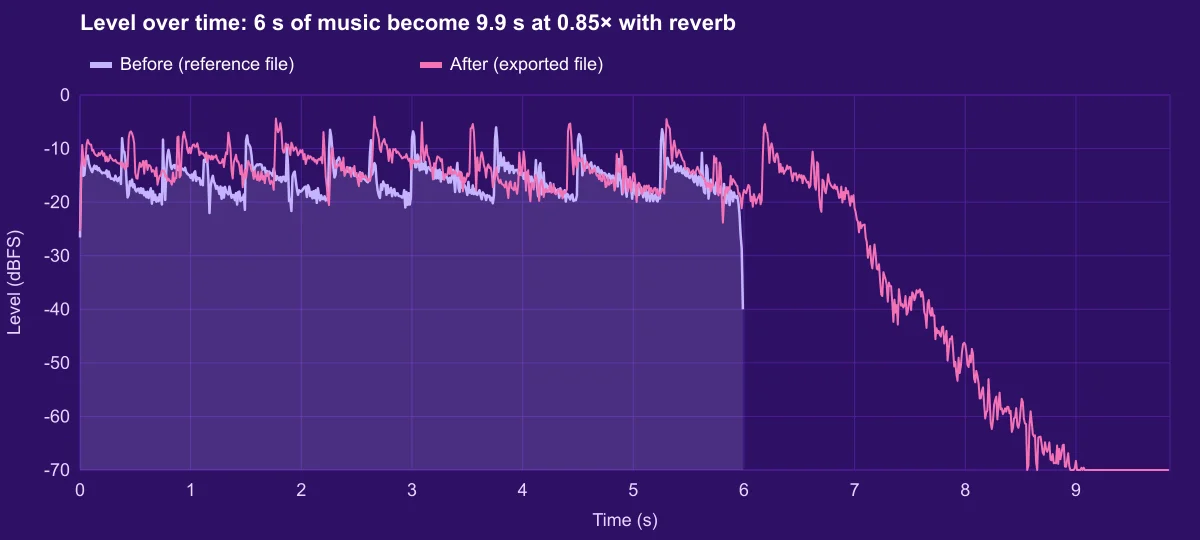
We applied the default Classic Slowed + Reverb settings (0.85× speed, pitch following the speed, 2.8 s decay, +3 dB sub-bass) to the reference music loop.
At 0.85× the music itself lasts 6 ÷ 0.85 = 7.06 s, and the file came out at 9.86 s with the reverb tail. Sound above −60 dBFS lasts until 8.89 s.
| Measured | Before | After |
|---|---|---|
| Duration | 6.00 s | 9.86 s |
| Audible until (−60 dBFS) | 6.00 s | 8.89 s |
| Sample peak | -3.0 dBFS | -0.3 dBFS |
| Average level (RMS) | -14.7 dBFS | -14.0 dBFS |
Reference file (before)
Exported file (after)
The peak reached -0.3 dBFS: the bass boost and the reverb both add level. Lower the sub-bass to 0 dB on songs that are already loud.
Download the reference file (WAV) · Same test on the tool page · Measured on November 11, 2026
Troubleshooting
| What you hear or see | Likely cause | What to change |
|---|---|---|
| The result sounds muddy | Too much reverb on a dense mix | Lower Reverb level to 20–25% before shortening the decay |
| The loudest beats distort | Sub-bass boost and reverb pushed the peak to 0 dBFS | Set Sub-bass to 0–1.5 dB, or normalize after applying |
| The voice sounds too deep or sluggish | Speed too low for this song | Use 0.88–0.9× instead of 0.75–0.85× |
| Tempo is right but it does not sound like a slowed edit | Keep original pitch is ticked | Untick it; the pitch drop is part of the style |
| The ending is cut off in the video editor | The video is shorter than the new audio | Trim the audio with a fade-out, or extend the video |
Limits, and the rights question
The effect is applied to the whole mix at once. It cannot slow the beat and keep the voice at its pitch, and it cannot add reverb only to the vocal; producers who make polished slowed versions often work from separate stems in a DAW. The reverb is the same synthetic convolution reverb as the Add Reverb tool, with a fixed 20 ms pre-delay and damping at 5 kHz.
A slowed or sped-up version of a song is still that song. Changing speed and adding reverb does not create a new work you can freely publish or monetize, and platforms detect slowed versions with the same content-identification systems they use for originals. Use songs you own or have a licence for, and on platforms that offer licensed music libraries, prefer their own speed controls.
Frequently asked questions
What speed is used for slowed songs?
Can I slow down without changing the pitch?
Why did my file get almost 4 seconds longer?
How do I make a nightcore version?
Can I upload a slowed song to YouTube or TikTok?
Sources and how this was tested
- Wikipedia: Chopped and screwed, section on slowed and reverb
- Wikipedia: Nightcore
- YouTube Help: How Content ID works
Tested on November 11, 2026 in Chromium 153 on Windows 11, with a production build of this site. Screenshots and measurements were made by the scripts in scripts/tool-evidence, from synthetic reference files anyone can download and repeat.