How to Adjust Audio Volume Online: The Complete Guide to Normalization 2026
Have you ever listened to a podcast where you cranked the volume to maximum just to follow the host — only to get blasted when the next episode started? Or recorded a conversation that was perfect in content but so quiet that virtually no one could hear it?
These are the most common audio volume problems, and they have a straightforward fix: normalization and amplification. In this complete guide, you will understand the difference between the two techniques, when to use each one, how to apply them professionally — all for free, right in your browser, with nothing to install.
Why Audio Volume Matters More Than You Think
Audio volume is not merely a comfort issue — it directly impacts the credibility of your content, the listener experience, and even your performance on digital platforms.
Platforms like Spotify, YouTube, Apple Podcasts, and Deezer apply automatic loudness normalization to everything they receive. If your audio arrives too loud, it will be turned down automatically — and if it arrives too quiet, the platform will not boost it for you. The result is content that sounds inconsistent or amateurish compared to professional productions.
From the listener's perspective, poorly adjusted volume creates three serious problems:
- Listening fatigue: The listener has to strain to understand the content and gives up sooner.
- Broken immersion: Volume jumps between episodes or tracks shatter the continuity of the listening experience.
- Reduced reach: Recommendation algorithms on platforms like Spotify indirectly penalize content with high drop-off rates — and poorly adjusted audio is one of the most common culprits.
Fixing volume is one of the post-production interventions with the highest return on time invested. In minutes, you can transform an amateur-sounding recording into something that sounds truly professional.
Amplification vs. Normalization: What Is the Difference?
Many content creators use "amplify" and "normalize" interchangeably. In practice, they are different techniques with distinct goals. Understanding this distinction is fundamental to choosing the right approach for every situation.
What Is Amplification?
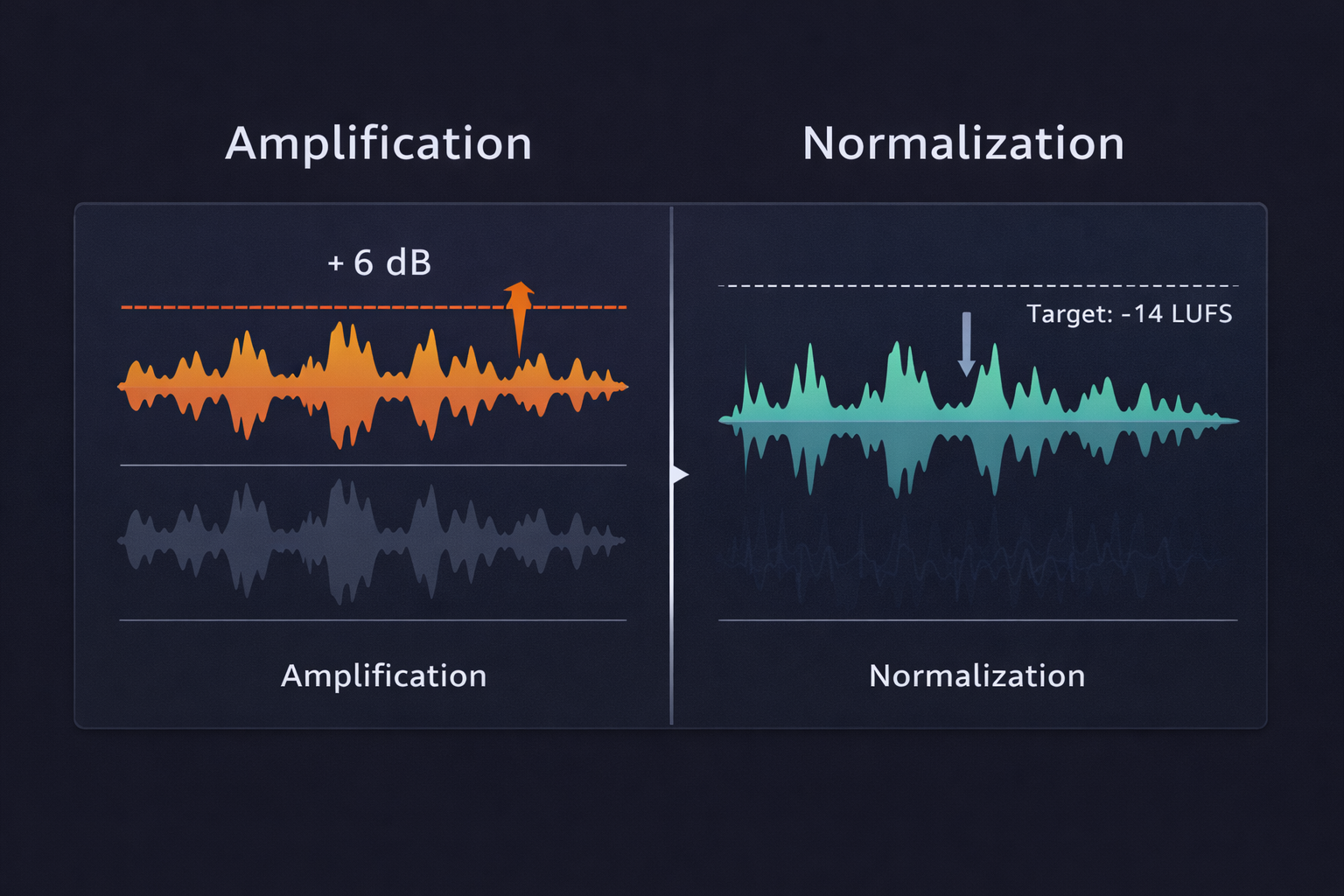
Amplification is the process of raising or lowering the volume of an entire file by a fixed amount, expressed in decibels (dB). If you amplify a file by +6 dB, every part of it becomes 6 dB louder — the quiet sections, the mid-level sections, and the loud peaks are all raised equally.
It is the right tool when you know exactly how much you need to adjust and want complete control over the result. For example: if you recorded a podcast and know the volume is 4 dB below the ideal level, you apply +4 dB of amplification and you are done.
Watch out for clipping: If the file already has peaks close to 0 dBFS and you amplify beyond that, the audio will "clip" — meaning it will distort irreversibly in the loudest sections. Always check your peaks before amplifying.
What Is Normalization?
Normalization is an automatic, intelligent process: the software analyzes the entire file, identifies the loudest peak, and adjusts the overall volume so that peak lands exactly at your chosen target level — without exceeding it.
For example: if you set normalization to -1 dBFS, the software finds the loudest peak in the file and scales everything proportionally so that peak sits at -1 dBFS. This delivers the maximum possible volume without distortion.
There are two main types of normalization:
- Peak Normalization: Targets the loudest single peak in the file. Fast and straightforward, but does not account for how audio is perceived by the human ear over time.
- LUFS Normalization (Loudness Normalization): Targets integrated loudness — the subjective perception of volume over the full duration of the file. This is the standard used by every major streaming platform and the recommended approach for professional production.
What Is LUFS and Why Does It Matter for Your Content?
LUFS (Loudness Units relative to Full Scale) is the unit for measuring integrated loudness — how audio volume is perceived by the human ear over time, rather than just the instantaneous peak level.
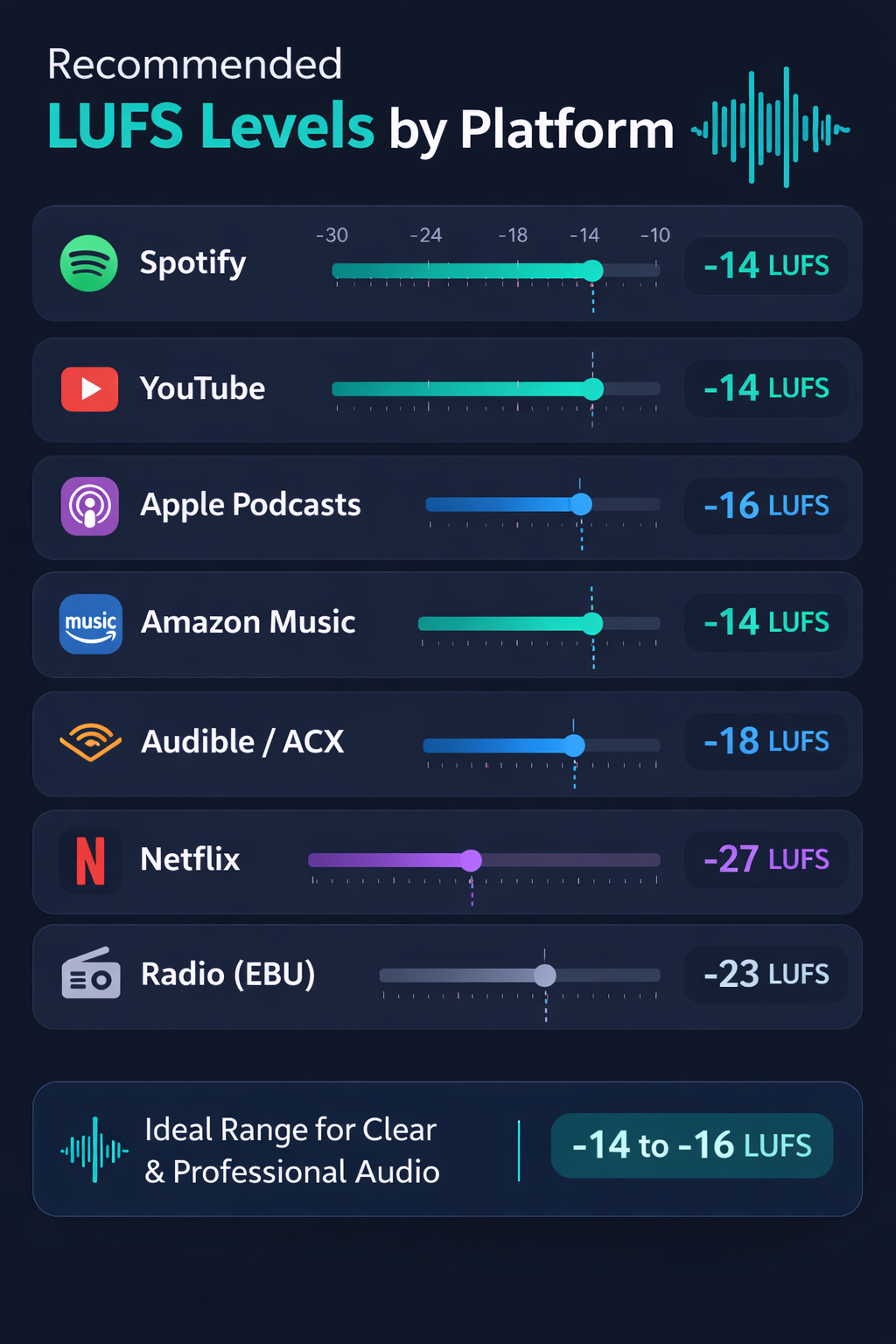
This measurement was developed to standardize volume in broadcast and streaming, and is now the industry standard. Each platform has its own reference target:
| Platform | Reference Level |
|---|---|
| Spotify | -14 LUFS |
| YouTube | -14 LUFS |
| Apple Podcasts | -16 LUFS |
| Amazon Music | -14 LUFS |
| Audible (Audiobooks) | -18 LUFS |
| Netflix (Dubbing / Narration) | -27 LUFS |
| Radio Broadcasting (EBU R128) | -23 LUFS |
What happens if you ignore these standards?
If your audio arrives at Spotify at -8 LUFS (too loud), the platform will automatically reduce the volume by roughly 6 dB before playback. This causes no distortion, but it means all the effort spent making the audio "loud" was wasted — and worse, it can introduce compression artifacts.
If it arrives at -22 LUFS (too quiet), Spotify simply plays it at the original level, and listeners will perceive your content as quieter than everything else in their playlist.
The fix is simple: normalize to the correct platform target before exporting.
How to Adjust Audio Volume Online: Step-by-Step
With Audio-Editor Online, the process is straightforward, free, and works in any modern browser — no account required, no extensions to install, and your files never leave your device.
Step 1: Open the tool and upload your file
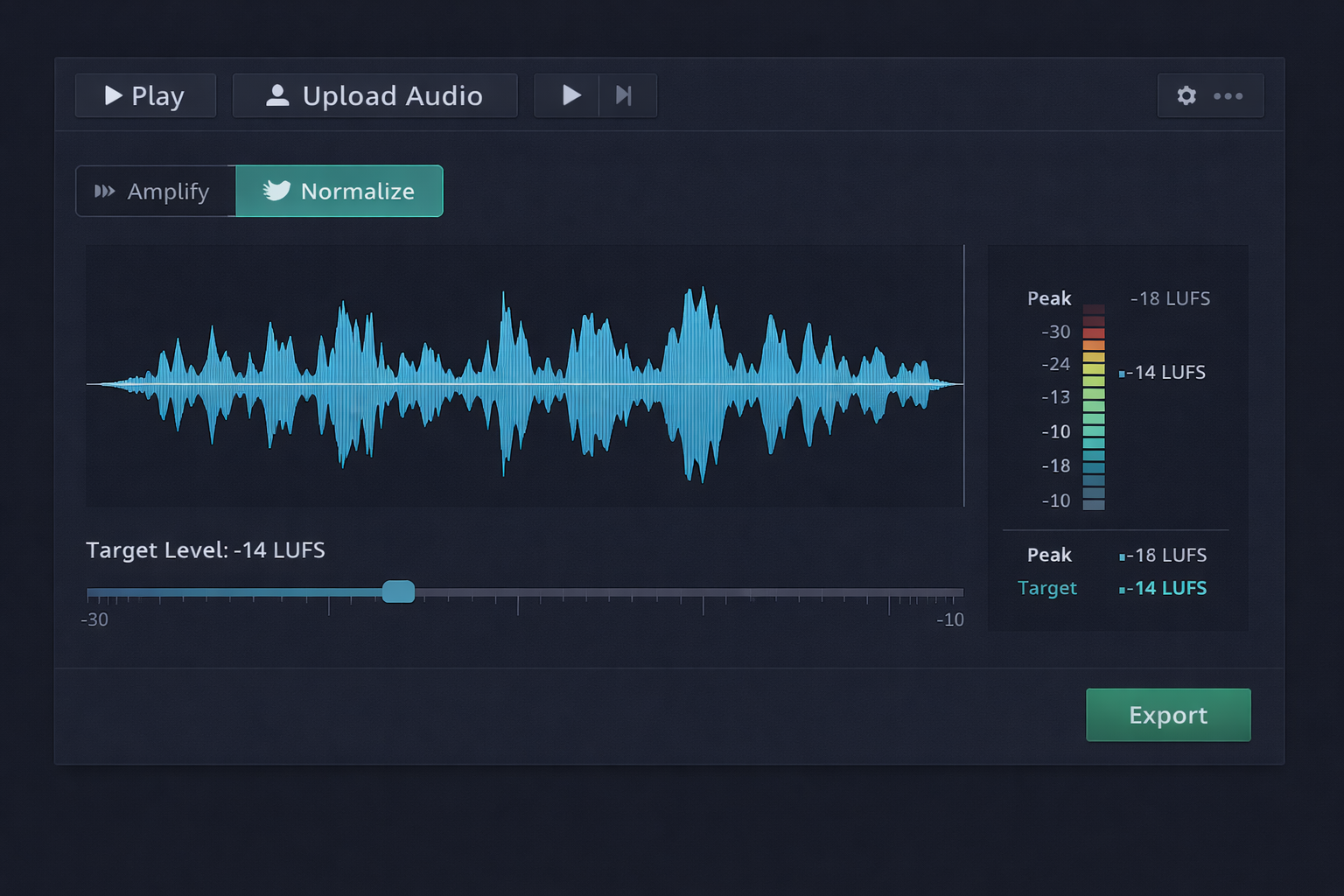
Go to the audio volume adjustment tool and upload your audio file. Supported formats include MP3, WAV, FLAC, OGG, and M4A. All processing happens locally in your browser, guaranteeing complete privacy.
Step 2: Analyze the current volume
Before making any adjustments, examine the level meter for the loaded file. Identify:
- What is the current peak level (in dBFS)?
- Are there sections with highly inconsistent volume?
- Are there any clearly distorted (clipped) parts?
This analysis will determine which technique to use and how much to adjust.
Step 3: Choose between amplification or normalization
Use amplification when:
- You know exactly how many dB you need to add or remove
- The file volume is consistent, just at the wrong level
- You want a quick, precise adjustment
Use normalization when:
- Volume is inconsistent throughout the file
- You want to ensure the audio reaches the maximum level without distortion
- You are publishing to streaming platforms (use the correct LUFS target)
Step 4: Apply the adjustment and preview
Set your desired value and play back the result before exporting. Compare it against the original using the toggle buttons. Pay particular attention to the loudest sections — that is where clipping appears first.
Step 5: Export in the right format
Once you are happy with the result, export the file. For maximum quality, use WAV (PCM 24-bit). For digital distribution, MP3 at 320 kbps is the recommended standard.
Quick Reference: How Much to Adjust for Each Situation
The table below serves as a quick reference for the most common scenarios:
| Scenario | Recommended technique | Target value |
|---|---|---|
| Podcast for Spotify / YouTube | LUFS Normalization | -14 LUFS |
| Podcast for Apple Podcasts | LUFS Normalization | -16 LUFS |
| Audiobook (Audible / ACX) | LUFS Normalization | -18 LUFS (–3 dBFS peak) |
| YouTube Video | LUFS Normalization | -14 LUFS |
| Music for Streaming | LUFS Normalization | -14 LUFS |
| Quiet recording | Amplification | +3 dB to +6 dB |
| Loud recording (no clipping) | Amplification | –3 dB to –6 dB |
| Final mastering export | Peak Normalization | –1 dBFS |
| Export for further editing | Peak Normalization | –6 dBFS (headroom) |
Complementary Techniques for Professional-Level Volume
Volume adjustment rarely works best in isolation. Combining it with other processing techniques significantly elevates the final quality.
Dynamic Compression
Compression is the most powerful technique for volume control. It automatically reduces the loudest sections and, optionally, boosts the quietest ones — making the volume much more consistent throughout the entire file. It is especially useful for voice recordings where the speaker varies greatly in intensity.
A well-configured compressor can eliminate the need for manual volume adjustments on specific sections, delivering a far more consistent listening experience from start to finish.
EQ Before Normalization
Before normalizing, it is worth equalizing the audio to cut problematic frequencies — particularly excessive low-end below 80 Hz, which consumes headroom without contributing to vocal intelligibility. Removing those frequencies first frees up dynamic space, letting you normalize more efficiently.
True Peak Limiting
A limiter is an extreme compressor that prevents the signal from exceeding an absolute ceiling. For the final export, it is recommended to apply a True Peak limiter at -1 dBTP — this ensures the audio does not distort even after format conversion, which can introduce small additional peaks.
Recommended processing order for voice:
- Noise reduction
- EQ (cut low-end and problem frequencies)
- Dynamic compression
- Normalization (to the platform's LUFS target)
- True Peak Limiter (–1 dBTP)
Real-World Use Cases: When Volume Adjustment Makes All the Difference
Podcasters and Content Creators
It is very common in podcasts with multiple hosts for each microphone to record at different levels. One host speaks close to the mic and sounds loud; another speaks from farther away and sounds quiet. LUFS normalization resolves this automatically, delivering a balanced mix without having to manually edit each track.
Teachers and Online Course Creators
Lessons recorded on different days, with different microphone setups or in different environments, often arrive in the editor with inconsistent volumes. Normalizing all lessons to -16 LUFS ensures every student has the same listening experience across every module of the course.
Journalists and Field Reporters
Field recordings made in outdoor environments capture audio at highly variable levels — depending on distance to the source, wind, and background noise. Careful amplification followed by normalization can salvage recordings that seemed unusable.
Independent Musicians
Before submitting tracks for distribution on platforms like Spotify or Apple Music, independent artists need to make sure the volume meets platform standards. Normalizing to -14 LUFS prevents the platform from automatically lowering the track volume, preserving the artist's dynamic choices.
Audiobook Producers
ACX (Audible's distribution platform) has strict technical requirements: integrated loudness between -18 and -23 LUFS, a peak ceiling of -3 dBFS, and background noise below -60 dBRMS. Precise normalization is mandatory to pass their quality review.
Common Volume Adjustment Mistakes (and How to Avoid Them)
Mistake 1: Amplifying beyond 0 dBFS
The classic blunder. When amplifying, if any section was already close to 0 dBFS, it will exceed the ceiling and distort — the dreaded digital clipping. Always check your peaks before amplifying and keep a safety margin of at least 1 dB.
Mistake 2: Normalizing without considering the destination platform
Normalizing to -1 dBFS (peak maximum) is very different from normalizing to -14 LUFS (integrated loudness for Spotify). Confusing the two approaches results in audio that sounds wrong on the final platform.
Mistake 3: Ignoring consistency across files
If you have multiple episodes or tracks, normalizing each one independently can create subtle inconsistencies. The correct approach is to define a single LUFS target and apply it uniformly to all files.
Mistake 4: Not checking on multiple devices
Audio that sounds great on studio headphones can sound very different through computer speakers or a phone's built-in speaker. Always test the result on at least two or three devices before publishing.
Mistake 5: Skipping compression before normalization
Normalizing audio with a very wide dynamic range (very quiet and very loud sections) without compressing first can result in a file where the peaks are controlled, but the quiet sections still sound muffled. Compressing before normalizing evens out the dynamics and delivers a far more consistent end result.

Frequently Asked Questions (FAQ)
What is the difference between dB and LUFS?
dB (decibel) is a generic measure of sound intensity. dBFS (decibels relative to Full Scale) measures the peak level of a digital file — 0 dBFS is the maximum before distortion. LUFS measures integrated loudness, or how volume is perceived by the human ear over time. For streaming distribution, LUFS is the correct measurement to use.
Can I normalize an MP3 without losing quality?
Normalization itself does not cause noticeable additional loss. However, every time you open, edit, and re-export an MP3 file, there is a small loss from recompression. To avoid this, always work with WAV or FLAC files during editing and export to MP3 only at the final step.
Does the tool handle large files?
Yes. Audio-Editor Online processes files locally in your browser, so there is no upload size limit imposed by a server. The practical limit is the memory available on your device.
Can I adjust the volume of just one section?
Yes. In the audio editor, you can select a specific section of the waveform and apply a volume adjustment only to that interval — leaving the rest of the file completely untouched.
Conclusion
Adjusting your audio volume doesn't have to be a complex process or require expensive software. With the right normalization and amplification techniques, and accessible tools like Audio-Editor Online, you can ensure your message is heard clearly and professionally on any platform.