Quick answer
Hum is one of the few noises that can be removed almost completely after the fact, because it is so predictable: it never changes pitch, and it lives at frequencies you can calculate. This guide shows how to confirm that what you hear is hum, why it gets into recordings, how to remove it in the browser step by step, and what to do when filtering is not enough.
How to recognize mains hum
Hum is a low, constant drone that does not stop when the speaker pauses. A low hum sounds like a soft "mmm" under everything; a buzzier one, rich in harmonics, sounds closer to a fluorescent lamp. Three quick checks separate it from other noise:
- Listen to a pause. Select half a second between two sentences and loop it. If you hear a pitched tone, it is hum. If you hear a soft "shhh", it is broadband hiss, which needs noise reduction instead.
- Check the pitch. 60 Hz falls between the notes B♭1 and B1; 50 Hz sits almost exactly on G1. If the tone is clearly higher, around 1 kHz or above, it is probably interference from a phone or a switching power supply, not mains hum.
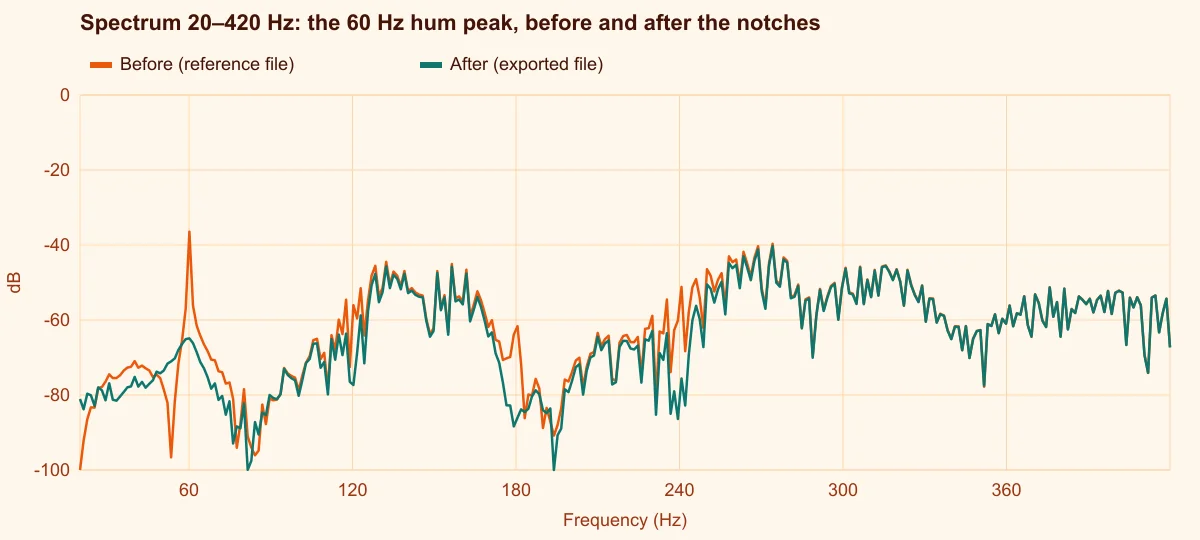
- Look at the spectrum. Hum shows as thin vertical spikes at 50 or 60 Hz and at whole multiples of it. Speech and music spread their energy over wide areas instead.
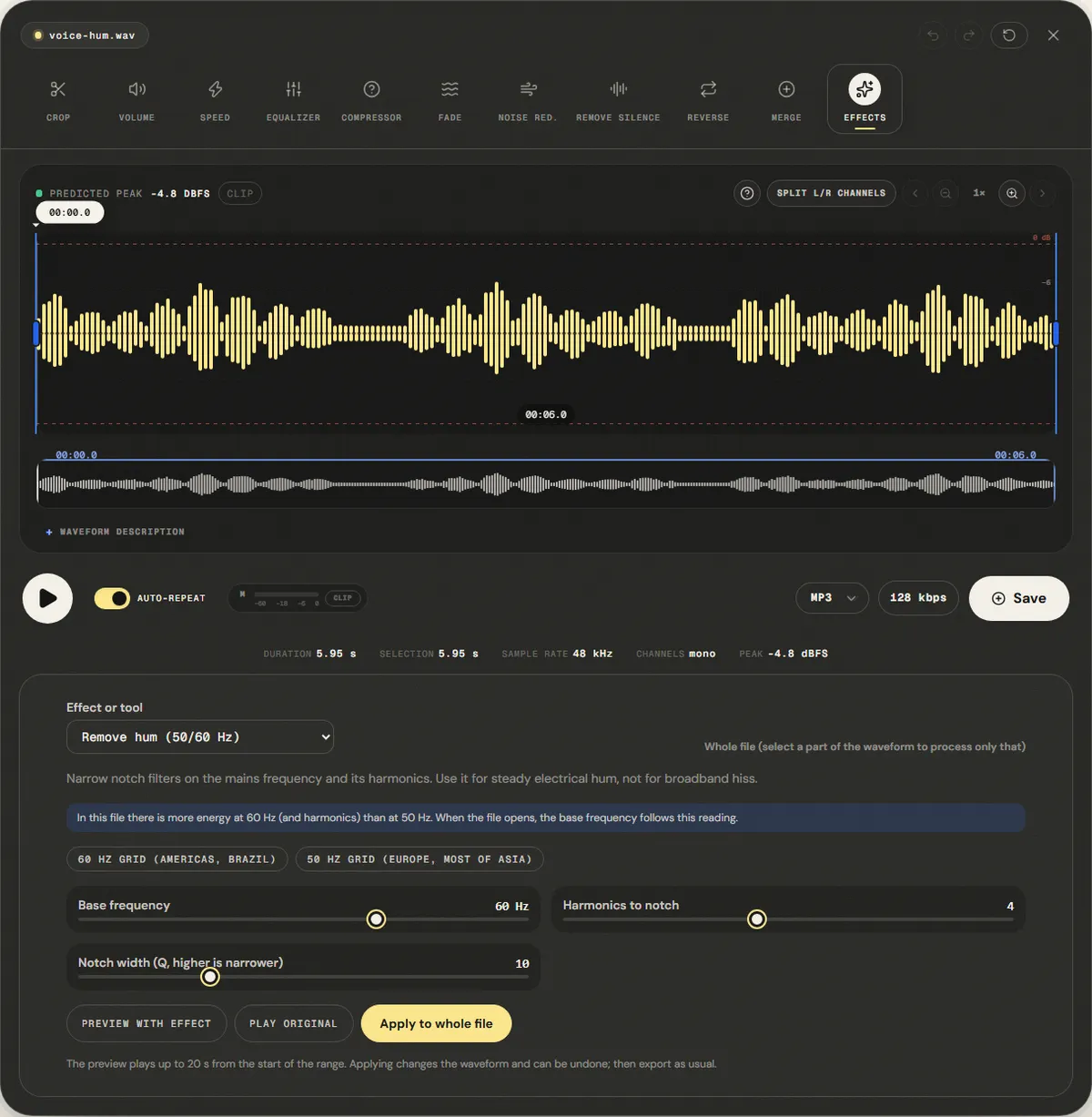
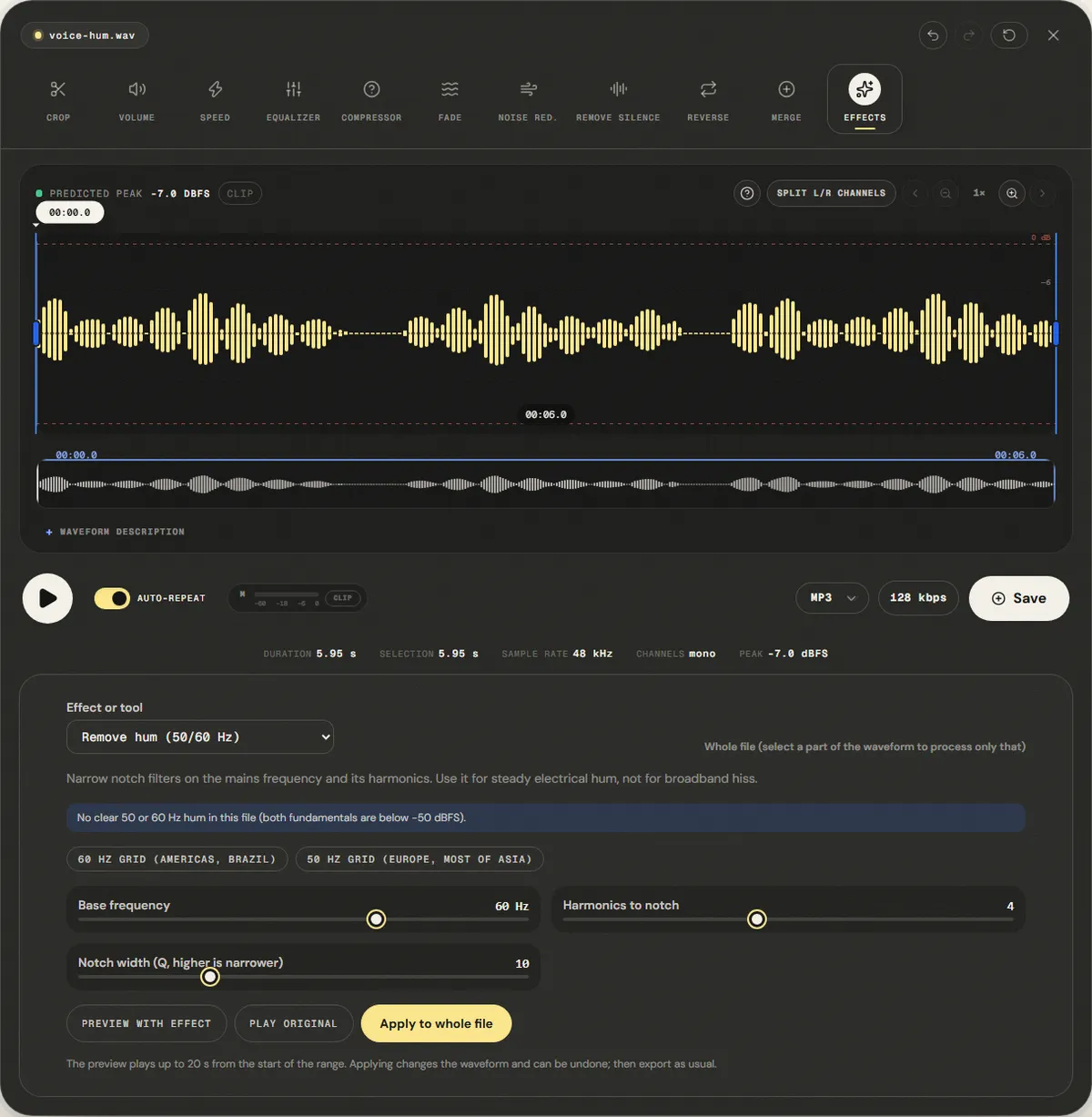
The waveform alone rarely reveals hum, as Figure 1 shows: a hum 20 dB below the voice peaks barely thickens the line in the pauses. The spectrum does. Figure 2 compares the first 420 Hz of the same file before and after the filter.
Why recordings pick up hum
Mains electricity alternates at a fixed rate set by the grid: 60 times per second in Brazil, the United States and Canada, 50 times per second in Europe, most of Asia, Africa and Argentina. Anything that couples that current into an audio signal leaves a tone at exactly that frequency. The two common paths are:
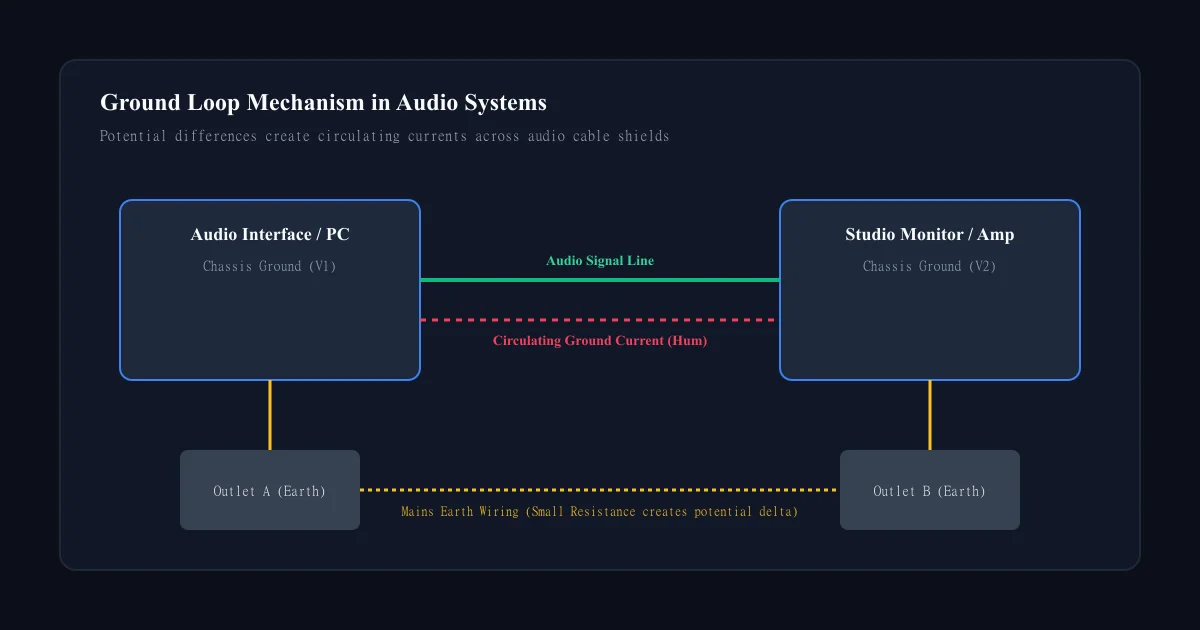
- Ground loops. Two devices are connected by an audio cable and also to different outlets. A small voltage difference between the two grounds pushes current through the cable shield, and the audio picks it up. The classic case is a laptop on its charger connected to a mixer or powered speakers on another outlet.
- Induction. Unbalanced cables (guitar cables, RCA, 3.5 mm) act as antennas near power cables, transformers and dimmers. Single-coil guitar pickups are especially sensitive; their hum changes as the player turns.
Real hum is not a pure sine. Power supplies and transformers distort the 60 Hz wave, which adds harmonics at 120, 180, 240 Hz and up. That is why hum often sounds like a buzz, and why a filter on 60 Hz alone leaves most of it in place.
Why a high-pass filter is the wrong tool
A high-pass filter at 80 Hz removes the 60 Hz fundamental but leaves 120, 180 and 240 Hz untouched. Raising it to 250 Hz removes them too, along with the fundamental of most male voices (roughly 85 to 155 Hz) and the body of every instrument. A notch filter does the opposite: it cuts a narrow slice around one frequency and leaves its neighbours almost intact. The width of the slice is about the frequency divided by the Q value, so at Q 10 the 60 Hz notch is about 6 Hz wide and the 240 Hz notch about 24 Hz wide.
How to remove hum, step by step
The Remove Hum page opens your file in the main editor with the Remove hum (50/60 Hz) effect already selected. You can reach the same effect from any editor page under Effects. Processing happens in your browser; the file is not uploaded.
Step 1: Open the file and read the panel
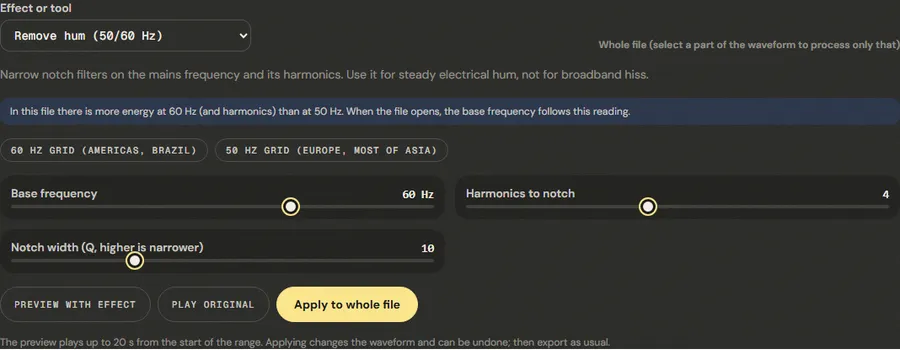
Drop the file on the page. As soon as it opens, the panel measures the energy at 50 Hz and at 60 Hz and sets Base frequency to the stronger one. If both are below −50 dBFS, it says there is no clear hum, which usually means the noise you hear is broadband and belongs to noise reduction.
Step 2: Choose what to process
With nothing selected, the whole file is processed. To treat only part of it, drag across the waveform; the line at the top right of the panel changes from "Whole file" to "Selection" with the start and end times. To judge the result later, it also helps to note a pause where nothing but hum is playing.
Step 3: Set the filters
- 60 Hz grid (Americas, Brazil) or 50 Hz grid (Europe, most of Asia): use these if the reading picked the wrong one. A file recorded in Brazil is almost always 60 Hz.
- Harmonics to notch (1 to 8, default 4): a soft, low hum needs 1 or 2. A buzzy hum needs 6 to 8. Each extra notch removes a little more of the sound around it, so use the fewest that make the hum disappear.
- Notch width (Q, higher is narrower) (2 to 30, default 10): a higher Q takes less of the voice or music near each harmonic, but if the hum drifts a little in pitch, a very narrow notch can miss it. Start at 10.
Step 4: Compare, apply and export
Preview with effect plays up to 20 seconds from the start of the range with the filters on; Play original plays the same stretch untouched. Compare them on the pause you noted. When it sounds right, click Apply to whole file (or Apply to selection). The waveform updates, the change can be undone, and you export from the editor as usual.
Measured example
We mixed a 60 Hz hum with its 120 and 180 Hz harmonics under the reference voice and opened it on the tool page. The panel read the stronger energy at 60 Hz and set the base frequency there; we applied the defaults (4 harmonics, Q 10) to the whole file and exported WAV.
The 60 Hz tone fell 40.9 dB, from -24.0 dBFS to -64.9 dBFS, and the 120 Hz harmonic 49.2 dB. The 300 Hz–3.4 kHz speech band changed +0.1 dB: the notches take the hum and leave the voice.
| Measured | Before | After |
|---|---|---|
| 60 Hz hum | -24.0 dBFS | -64.9 dBFS |
| 120 Hz harmonic | -29.6 dBFS | -78.8 dBFS |
| Speech band 300 Hz–3.4 kHz | 33.8 dB | 33.9 dB |
Reference file (before)
Exported file (after)
This is a clean case: steady hum at exactly 60 Hz. Hum whose pitch drifts, or a bass note sitting on 60 or 120 Hz, behaves differently; test on a pause first.
Download the reference file (WAV) · Same test on the tool page · Measured on November 11, 2026
Two details from this test are worth keeping in mind. First, the 120 Hz harmonic fell even further than the fundamental, 49 dB, because the voice has little energy exactly there. Second, the speech band barely moved: four notches remove 6 to 24 Hz each from a band thousands of hertz wide. The cost of filtering shows up only if the music itself has a strong note on one of those frequencies.
Troubleshooting
| What you hear or see | Likely cause | What to change |
|---|---|---|
| The hum is quieter but a buzz remains | Harmonics above the ones you notched | Raise Harmonics to notch to 6 or 8 |
| The panel says there is no clear hum, but you hear noise | Broadband hiss, fan or air conditioning, not mains hum | Use background noise removal instead |
| Hum comes and goes, or wobbles in pitch | Hum from a generator or a motor whose speed changes | Lower Q to 5 or 6 so each notch is wider |
| The bass of a song sounds thinner after filtering | A bass note sits on 60 or 120 Hz | Use fewer harmonics, or apply only to the intro and pauses |
| A whine around 1 kHz or higher remains | Interference from a phone or switching power supply, not mains hum | A notch at the base frequency cannot reach it; use the equalizer to cut that frequency |
Limits, and when to fix it at the source
Notch filters remove whatever sits on those frequencies, including wanted sound. On speech this costs almost nothing. On music with a bass line, a notch at 120 Hz takes part of every note that lands near it. Dedicated restoration software uses adaptive filters that follow the hum's exact frequency and subtract an estimate of its waveform; that matters when the hum drifts or sits under a bass instrument, and is beyond what this tool does.
The better fix is to stop the hum before recording:
- Plug the computer, the audio interface and the speakers into the same power strip.
- Run the laptop on battery while recording; if the hum disappears, the charger was part of a ground loop.
- Use balanced cables (XLR or TRS) for long runs; the interface cancels hum picked up along the way.
- Keep microphone and instrument cables away from power bricks and dimmers, and cross power cables at right angles instead of running alongside them.
- For instruments, a DI box with a ground lift switch breaks the loop without touching mains earth. Never remove the earth pin from a plug.
Frequently asked questions
Is my hum 50 Hz or 60 Hz?
How many harmonics should I remove?
Will removing hum change the sound of a voice?
Can I remove hum from a video?
Why does the hum come back after I export to MP3?
Sources and how this was tested
- Robert Bristow-Johnson, Audio EQ Cookbook (W3C Note): notch filter and Q
- Rane, RaneNote 110: Sound System Interconnection (ground loops)
- Audacity Manual: Notch Filter
- MDN: BiquadFilterNode (the browser filter used here)
Tested on November 11, 2026 in Chromium 153 on Windows 11, with a production build of this site. Screenshots and measurements were made by the scripts in scripts/tool-evidence, from synthetic reference files anyone can download and repeat.