Quick answer
Clicks are small, but they are what makes a close-miked voice sound wet and tiring on headphones. This guide covers how to find them, where they come from, how the detector decides what is a click, how to remove them in the browser, and what our tests showed, including how often the detector also flags sounds that are not clicks.
How to recognize clicks
A click is a sound shorter than about 4 milliseconds that is much sharper than anything around it. You hear it as a tick, a smack or a crackle. Three families sound different and come from different places:
- Mouth clicks: wet smacks when the lips or tongue separate, most noticeable at the start of words and after a breath. They get worse with a dry mouth, coffee or nerves.
- Vinyl and tape ticks: dust, scratches and static on records; dropouts on old tape. Random, often dozens per minute.
- Digital glitches: a single tick where a recording dropped samples (a buffer underrun) or where two pieces of audio were joined without a fade.
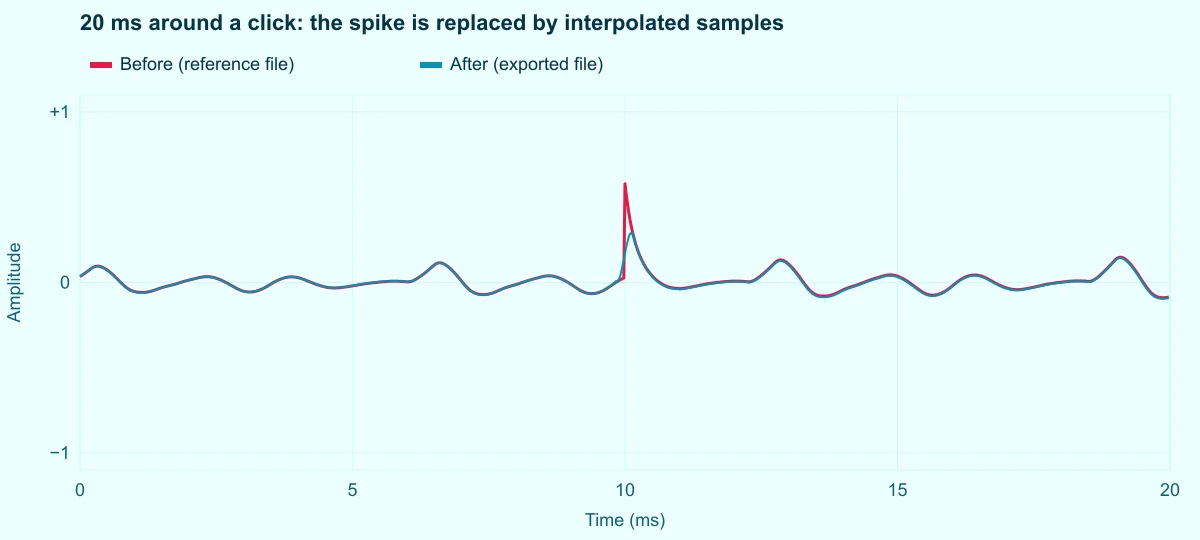
On the waveform, zoomed out, clicks are almost invisible. Zoomed in to a few milliseconds, each one is a needle that jumps away from the smooth wave and back.
How the detector tells a click from sound
Sound from a voice or an instrument changes direction smoothly, because air and strings have mass and cannot reverse instantly. A click reverses almost instantly. The detector measures exactly that: for every sample it computes the second difference, x[n] − 2·x[n−1] + x[n−2], which is large when the wave bends sharply. It compares that value with the average bend in a short window around it (192 to 384 samples, depending on the preset). Where the bend is many times larger than its surroundings, and the region lasts less than the maximum click length, the samples are marked.
Marked samples are removed and redrawn with a cubic Hermite curve that starts and ends with the slopes of the clean samples on each side. Nothing else in the file is touched. The threshold is relative, so a click is judged against its local surroundings: the same tick is obvious in a pause and easy to miss inside a loud phrase.
The weakness is just as clear. Anything that bends sharply looks like a click to this detector: hard consonants such as T and K, the leading edge of a drum, and voices or synthetic sounds with very sharp pulses. That is why the threshold matters, and why listening after applying is part of the job.
How to remove clicks, step by step
The Remove Clicks page opens your file in the editor with Remove clicks selected in the Effect or tool menu. Processing runs in your browser.
Step 1: Open the file and read the count
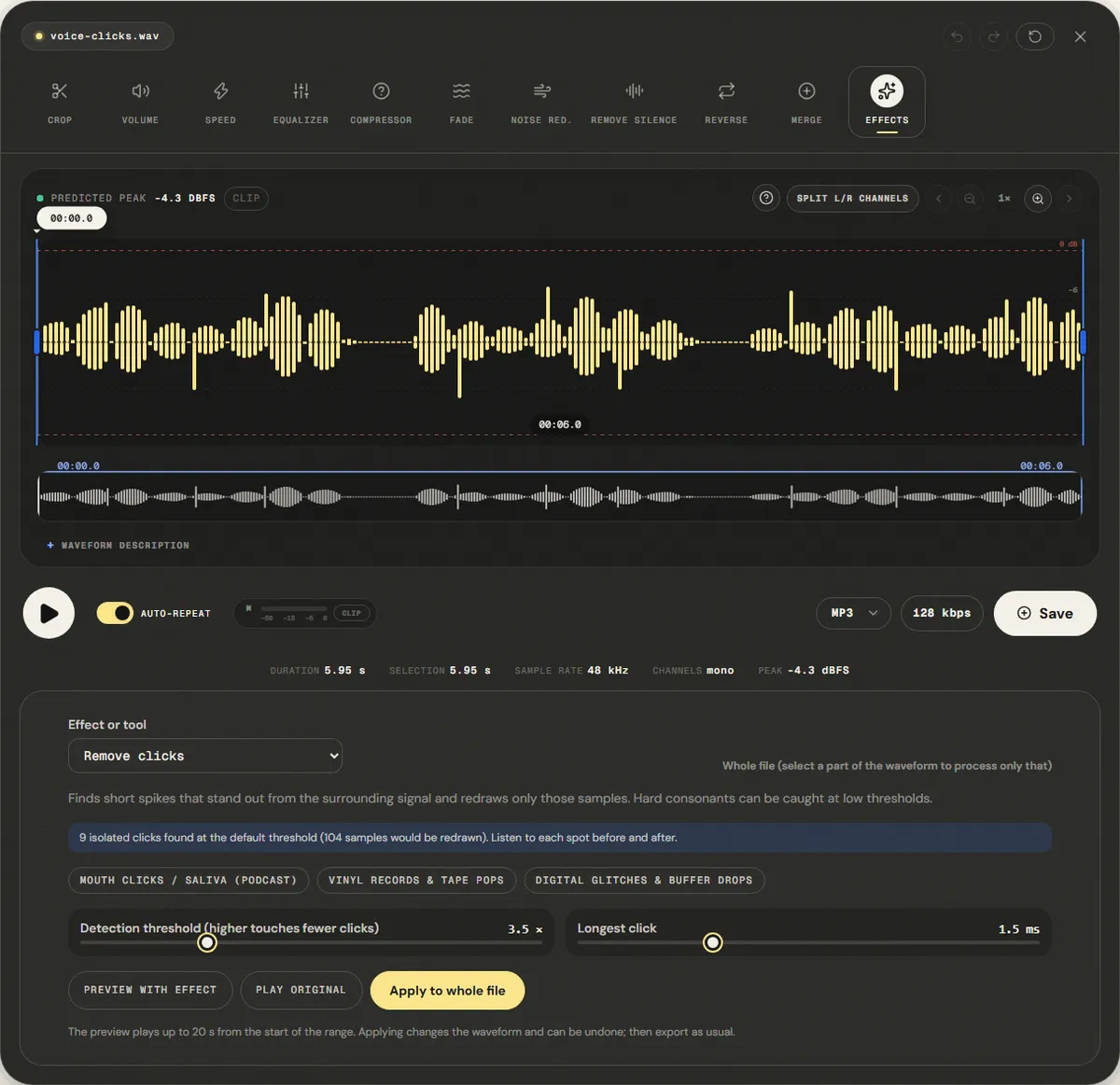
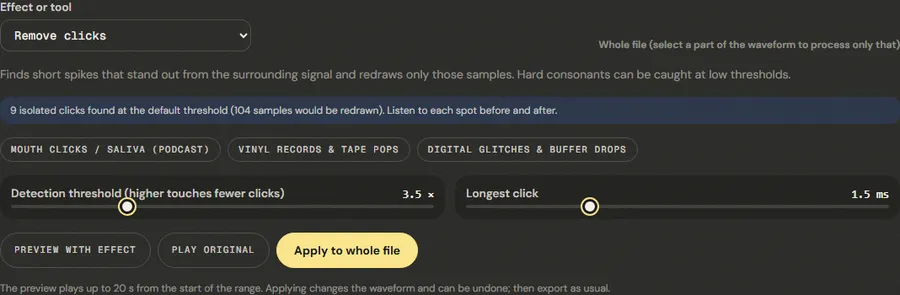
When the file opens, the panel runs the detector with the default preset and reports how many isolated clicks it found and how many samples would be redrawn. On our reference file it found all nine clicks we had added. A spike counts only if it is at least twice the size of any other sharp bend within 10 ms and stands out from the sound around it, so the regular pulses of a voice are not counted.
Step 2: Pick the preset that matches the noise
- Mouth Clicks / Saliva (Podcast): threshold 3.5×, clicks up to 1.5 ms. The default, for speech.
- Vinyl Records & Tape Pops: threshold 5×, clicks up to 3 ms, with a wider window. Less sensitive, so music transients survive.
- Digital Glitches & Buffer Drops: threshold 3×, clicks up to 1 ms. For single ticks at edit points or dropouts.
Detection threshold (higher touches fewer clicks) goes from 2× to 8×; Longest click from 0.5 to 4 ms. Raise the threshold if consonants lose their edge; lower it if clicks remain.
Step 3: Process the whole file or only the bad parts
On a podcast, the whole file is usually fine. On music, select only the passages with clicks, such as the quiet intro of a vinyl rip, so drum hits elsewhere are not touched. The line at the top right of the panel shows whether it will act on the whole file or on the selection.
Step 4: Compare and apply
Preview with effect and Play original play the same stretch. Listen for two things: the clicks should be gone, and words beginning with P, T and K should still sound crisp. Then click Apply to whole file or Apply to selection. The change can be undone.
A manual pass for the clicks that remain
On a long voice-over, a handful of clicks often survives a gentle setting. Hunting them one by one is faster than raising the sensitivity for the whole file:
- Play the file on headphones and pause at each click you hear; note the time on the playhead.
- Zoom in with the magnifier button above the waveform until a few hundred milliseconds fill the screen. The click is the thin needle near that time.
- Drag a selection of about 20 to 50 ms around the needle. A short selection keeps the repair away from the words on either side.
- Choose Digital Glitches & Buffer Drops (threshold 3×) and click Apply to selection. Inside such a short range, the most sensitive preset only finds the click.
Five or six of these take a couple of minutes and leave the rest of the recording exactly as it was.
Measured example
We dropped nine 1-millisecond spikes into the reference voice, in phrases and in pauses, like mouth clicks or vinyl ticks, and applied the default Mouth Clicks / Saliva (Podcast) preset to the whole file.
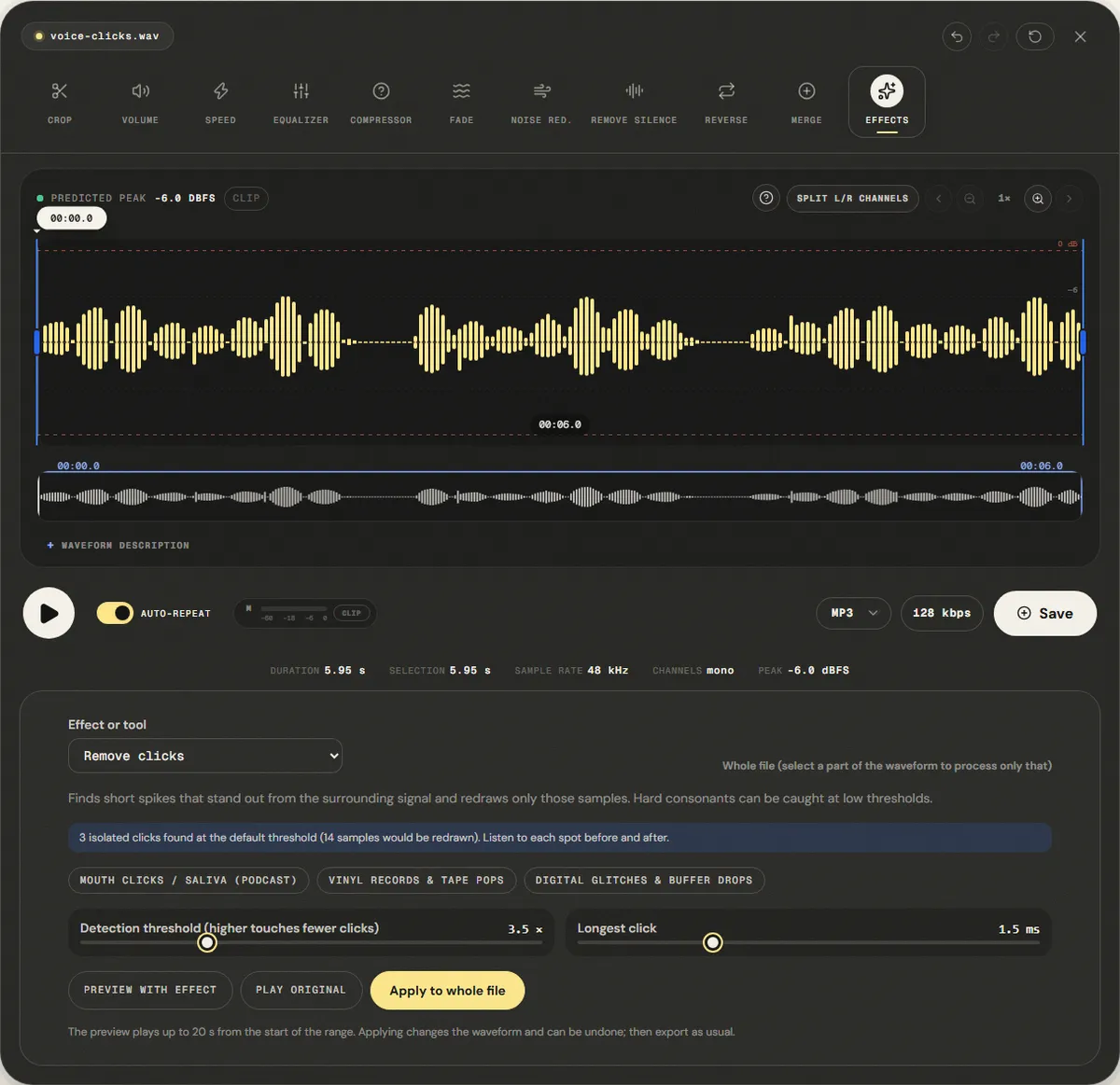
Our spike detector counts 9 clicks before and 0 after. The clicks were the loudest moments of the file, so the peak fell from -4.0 dBFS to -6.0 dBFS while the average level stayed at -20.4 dBFS.
| Measured | Before | After |
|---|---|---|
| Clicks detected | 9 | 0 |
| Sample peak | -4.0 dBFS | -6.0 dBFS |
| Average level (RMS) | -20.4 dBFS | -20.4 dBFS |
Reference file (before)
Exported file (after)
Synthetic clicks are sharper than real ones. Real mouth clicks blend with consonants, so listen after applying and raise the threshold if hard consonants lose their edge.
Download the reference file (WAV) · Same test on the tool page · Measured on November 12, 2026
We also opened the clean version of the same voice, with no clicks added. The panel found no clicks at any of the three presets, so applying changed nothing. An earlier version of the detector counted 1,249 transients in that clean file, because every glottal pulse of a voice is a sharp bend too; it now requires a click to stand alone. On the file with clicks, the repair redrew 104 samples, the sharp start of each click. After applying, the panel still reported 3 small leftovers, because a click's tail fades over about a millisecond; they no longer show as spikes in our measurement. If you hear one, select it and apply again.
Troubleshooting
| What you hear or see | Likely cause | What to change |
|---|---|---|
| Clicks remain after applying | Threshold too high for this recording, or clicks longer than the Longest click setting | Lower the threshold by 0.5 to 1, or raise Longest click to 2 or 3 ms |
| Words starting with T, K or P sound dull | Hard consonants detected as clicks | Undo and raise the threshold, or select only the pauses |
| Drums or plucked notes lost their attack | Musical transients detected as clicks | Use the Vinyl preset, or process only the passages with ticks |
| A low thump remains on P and B | A plosive pop, which lasts 20 to 100 ms | Use the plosive tool, not the de-clicker |
| Continuous crackle or hiss remains | Hundreds of overlapping ticks or broadband noise | Background noise reduction after de-clicking |
Limits and alternatives
The longest click the tool will redraw is 4 ms. Anything longer, such as a microphone bump, a plosive or a chair creak, is outside its window. Two clicks of similar size less than about 10 ms apart hide each other from the detector, and heavy vinyl crackle is hundreds of such ticks per second; the tool leaves most of it in place. Dedicated restoration suites detect clicks in the frequency domain and model the missing audio from a longer context, which works better on music and on dense crackle.
For mouth clicks, prevention is easier than repair. Drink water (not coffee or milk) before recording, take a sip between segments, and keep the microphone slightly off-axis. A bite of green apple is a common voice-over habit for a dry mouth; try it and judge by the next take. When only a few clicks remain in a long recording, it is often quicker to select each one and apply the repair to that selection than to process the whole file.
Frequently asked questions
Why does the panel find no clicks when I can hear one?
Will the de-clicker change my voice?
Can it remove pops from P and B sounds?
Which preset is right for a vinyl rip?
Should I remove clicks before or after other processing?
Sources and how this was tested
- Audacity Manual: Click Removal
- Simon Godsill and Peter Rayner, Digital Audio Restoration (Springer, 1998)
Tested on November 11, 2026 in Chromium 153 on Windows 11, with a production build of this site. Screenshots and measurements were made by the scripts in scripts/tool-evidence, from synthetic reference files anyone can download and repeat.