Quick answer
Removing the voice from a finished song is one of the most requested audio edits and one of the most misunderstood. This guide explains which songs the technique works on, why the voice never fully disappears, how to run it in the browser, what our test measured, and when a source-separation tool is the better choice.
Will it work on your song?
Mid/side cancellation relies on one assumption: the lead vocal is panned dead centre, identical in both channels, and the instruments are not. That holds for most commercial pop, rock and sertanejo mixes since the 1970s. It fails, or works badly, when:
- The song is mono or nearly mono, such as old recordings and many phone videos. There is nothing in the sides to keep.
- The vocal has stereo reverb or doubling. The dry voice cancels, but its reverb and harmonies, which differ between channels, stay as a ghostly echo.
- Bass, kick and snare are also in the centre, as they almost always are. They would cancel too, which is why the tool keeps the low end separately.
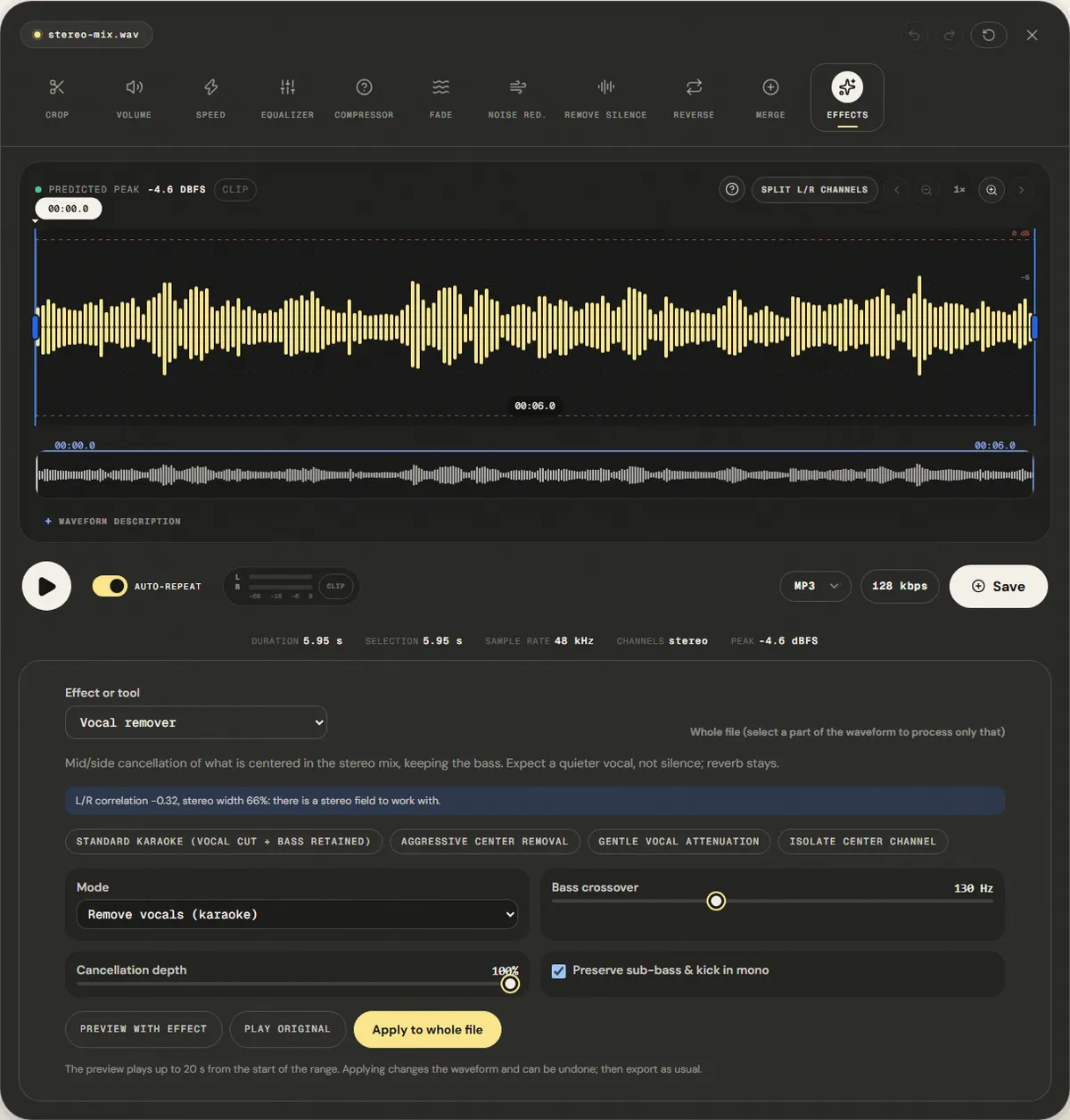
The panel checks the first point for you. When the file opens it measures the correlation between the channels and the stereo width. On our test file it read "L/R correlation −0.32, stereo width 66%: there is a stereo field to work with." On a mono file it warns that there are no channel differences to work with.
How mid/side cancellation works
Any stereo signal can be rewritten as two other signals: mid, (L + R) ÷ 2, which holds what both channels share, and side, (L − R) ÷ 2, which holds what differs. A centred vocal lives entirely in mid. The karaoke output is built from side, so the centre disappears:
- Side goes to the left channel as is, and to the right channel inverted.
- Mid below the bass crossover (130 Hz by default) is added back to both channels, so the kick and bass guitar survive.
- Mid above about 9.5 kHz is added back at half level, so cymbals and air are not lost.
Cancellation depth blends this result with the original: 100% is the full effect, 70% leaves some of the voice.
Why the voice never fully disappears
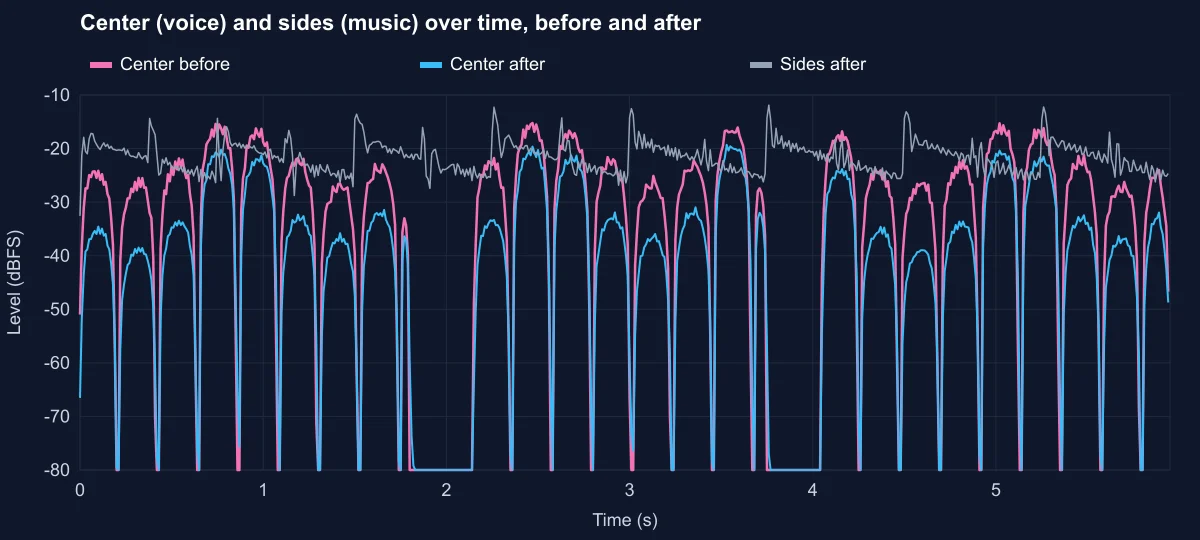
The bass crossover is a trade-off. Below 130 Hz the centre is kept to save the kick and bass, but a voice's fundamental often sits between 100 and 250 Hz. Part of it falls under the crossover and stays. Above 9.5 kHz, the sibilance of the voice comes back at half level with the cymbals. Add reverb and backing vocals, which are rarely perfectly centred, and the usual result is a quieter, thinner vocal rather than none.
Why the result sounds wrong on a phone speaker
Because the right channel carries the side signal inverted, the two channels of the result are largely out of phase. On headphones and stereo speakers that is fine. Played through one speaker, the channels are summed and the side signal cancels itself: only the kept bass and highs remain. In our test file, the mono sum of the result measured −29.1 dBFS against −20.1 dBFS on each channel. If the karaoke track will play on a phone, a single Bluetooth speaker or a mono PA, check it in mono first, or use the Gentle Vocal Attenuation preset, which keeps 30% of the original.
How to remove vocals, step by step
The Vocal Remover page opens the file in the editor with Vocal remover selected in the Effect or tool menu. Everything runs in your browser.
Step 1: Open a stereo file and read the panel
Use the best-quality file you have: a WAV or a high-bitrate MP3. Low-bitrate MP3 and AAC encoders store the sides less precisely, which leaves more of the voice behind. Then read the correlation line in the panel.
Step 2: Choose a preset
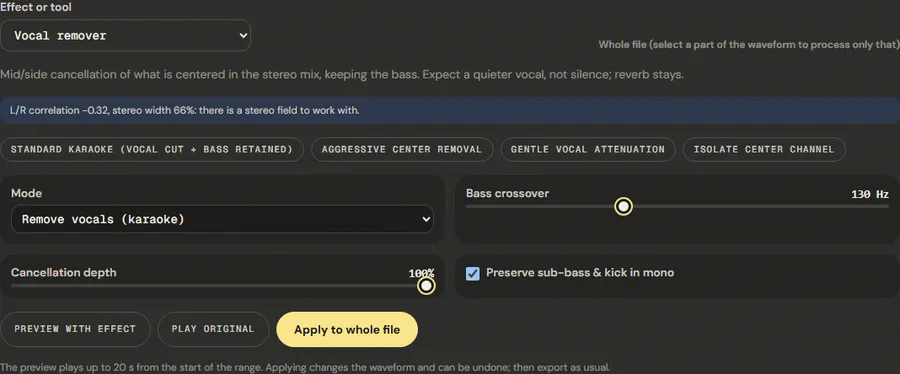
- Standard Karaoke (Vocal Cut + Bass Retained): crossover 130 Hz, full depth. The default and what we measured.
- Aggressive Center Removal: crossover 90 Hz and highs kept only above 12 kHz, so more of the voice goes, along with more of the centred bass.
- Gentle Vocal Attenuation: 70% depth, crossover 140 Hz. Lowers the voice and stays closer to the original, which also helps on mono playback.
- Isolate Center Channel: the opposite job. It keeps what is centred and removes the sides, for a rough a cappella or a cleaner dialogue track.
Mode switches between Remove vocals (karaoke) and Isolate center (acapella). Bass crossover goes from 60 to 250 Hz; Cancellation depth from 0 to 100%; Preserve sub-bass & kick in mono keeps the low end centred.
Step 3: Preview, apply and check in mono
Compare Preview with effect and Play original on a chorus, where the voice is loudest. Click Apply to whole file, then listen once more on the device the result is meant for. Export from the editor.
Turning the result into a usable karaoke track
Removing the voice is usually the first of a few steps. In the same editor session:
- Change the key if needed. Apply Change pitch after the vocal removal, not before: cancellation depends on the two channels lining up exactly, and processing them first can disturb that.
- Trim the start and end. Cut long intros and fade the ending with the fade tool, so the track starts when the singer is ready.
- Even out the level. Removing the centre lowers the overall level. Normalize the result so it plays as loud as other tracks in a playlist.
- Test on the real speaker. If it is a mono party speaker or a phone, compare with the Gentle preset before the event, not during it.
For a rehearsal track where you want to hear a faint guide vocal, Gentle Vocal Attenuation is often better than full removal: the melody is still there to follow, but quiet enough to sing over.
Measured example
We built a stereo test file where only the voice is in the center (identical in both channels) and the music bed is on the sides, so each can be measured on its own. We applied the default Remove vocals (karaoke) settings.
The center (the voice) fell 5.5 dB, from -23.6 dBFS to -29.1 dBFS, while the sides (the music) changed +0.1 dB.
| Measured | Before | After |
|---|---|---|
| Center (voice) | -23.6 dBFS | -29.1 dBFS |
| Sides (music) | -20.7 dBFS | -20.6 dBFS |
Reference file (before)
Exported file (after)
The voice does not disappear, by design: below the 130 Hz crossover the center is kept in mono to save the kick and bass, and the voice's fundamental (here between about 100 and 170 Hz) partly sits in that range. On real songs, reverb on the vocal adds to what remains.
Download the reference file (WAV) · Same test on the tool page · Measured on November 11, 2026
Troubleshooting
| What you hear or see | Likely cause | What to change |
|---|---|---|
| The voice is still clearly audible | Reverb, doubled vocals or a voice that is not centred | Try Aggressive Center Removal; accept that reverb stays |
| The bass or kick disappeared | Preserve sub-bass is off, or the crossover is too low | Tick Preserve sub-bass & kick in mono, raise the crossover to 130–160 Hz |
| The result sounds hollow or phasey on a phone | Out-of-phase channels cancel when summed to mono | Use Gentle Vocal Attenuation, or play the result in stereo |
| Nothing changed | The file is mono or nearly mono | The technique cannot work; use an AI separation tool |
| Cymbals sound harsh after removal | The kept highs include the voice's sibilance | Use the de-esser on the result, or the Aggressive preset |
Limits and the AI alternative
Mid/side cancellation is fast, predictable and runs entirely on your computer, but it only knows where a sound is, not what it is. Source-separation models trained on thousands of songs (Demucs, Spleeter and the services built on them) recognise the voice itself and can remove it even when it has reverb or sits off-centre. They need much more computing power and usually a server, and they leave their own artifacts, a watery or metallic sound in busy passages.
For a quick karaoke track from a typical stereo pop song, this tool is often enough. For a clean instrumental to publish, or for a song where the voice is not centred, use a separation model. Either way, check the rights: removing the voice does not make a commercial recording free to use.
Frequently asked questions
Can it remove vocals completely?
Is this an AI vocal remover?
Why does my karaoke track sound strange on my phone?
Can I get only the vocals?
Does it work on MP3 files?
Sources and how this was tested
- Wikipedia: Joint encoding and mid/side stereo
- Défossez et al., Demucs: music source separation (GitHub)
Tested on November 11, 2026 in Chromium 153 on Windows 11, with a production build of this site. Screenshots and measurements were made by the scripts in scripts/tool-evidence, from synthetic reference files anyone can download and repeat.