Quick answer
DJs need BPM to mix two songs, producers to match a sample to a project, runners and instructors to build playlists at a steady pace, and video editors to cut on the beat. This guide explains what BPM is, how automatic detection works and where it fails, how to use the detector and tap tempo in the browser, and what our test measured.
What BPM measures, and the half/double problem
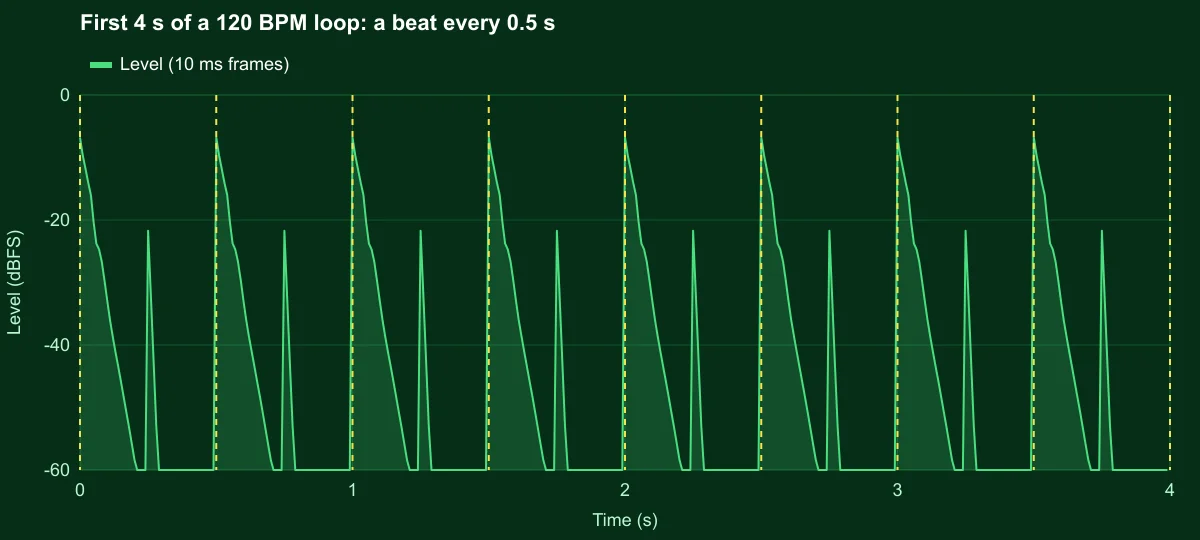
BPM counts the pulse you would tap your foot to. At 120 BPM there is a beat every 0.5 seconds; at 90 BPM, every 0.67 seconds. The catch is that music has pulses at several levels at once: a song at 140 BPM has a half-time feel at 70 and hi-hats running at 280. Which one is "the" tempo is partly a convention of the genre. Hip-hop is usually counted slow, drum and bass usually fast, and the same track can be read either way.
That is why a detector that says 64 BPM on a dance track is not exactly wrong; it found a real pulse, one level down. Our detector shows the half and double values next to the result so you can pick the one that matches how the music is counted.
How automatic tempo detection works
Our detector follows the standard approach in four steps:
- Onset energy. It splits the audio into frequency bands and follows the energy in each, so a kick drum and a hi-hat both count.
- Envelope differentiation. It keeps only the increases in energy, the moments when something starts. That curve has a peak at every hit.
- Autocorrelation. It compares the curve with delayed copies of itself. When the delay equals the beat period, peaks line up with peaks and the match is strongest. It searches delays that correspond to 55 to 210 BPM.
- Harmonic disambiguation. Half and double periods also line up, so it weighs them to choose the most likely level.
It analyses the first 20 seconds of the file, which the widget shows shaded on the waveform. The confidence badge is a heuristic: how much the best tempo stands out from the others, scaled and capped between 30% and 98%. Treat it as "clear pulse" versus "unclear pulse", not as a probability.
How to find a song's BPM, step by step
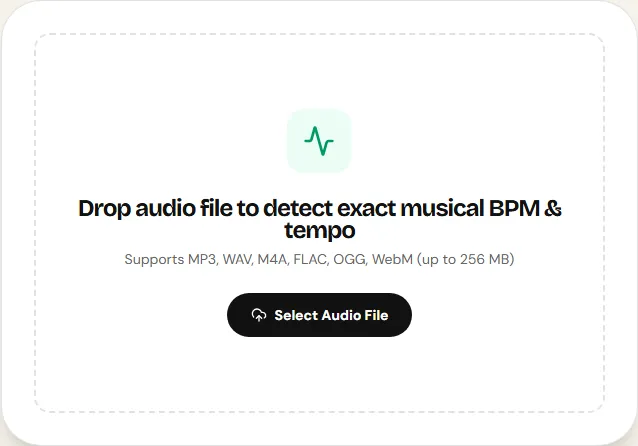
The BPM Finder page runs everything in your browser.
Step 1: Load the song
Drop the file on the widget. The first 20 seconds are analysed and the result appears in a second or two. If the song has a long, beatless intro, trim it first in the cutter so the analysed part contains the beat.
Step 2: Read the result and its neighbours
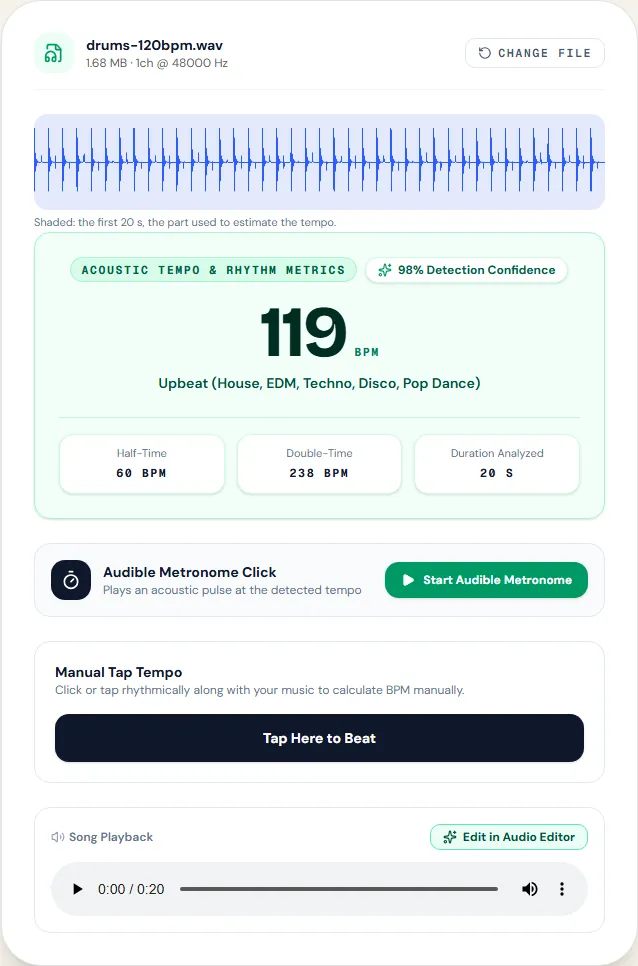
Under the main number are Half-Time and Double-Time. The genre line is a hint based on the tempo range only (for example 115 to 135 BPM is labelled house, EDM, techno, disco and pop dance); it does not analyse the style of the music.
Step 3: Confirm with tap tempo or the metronome
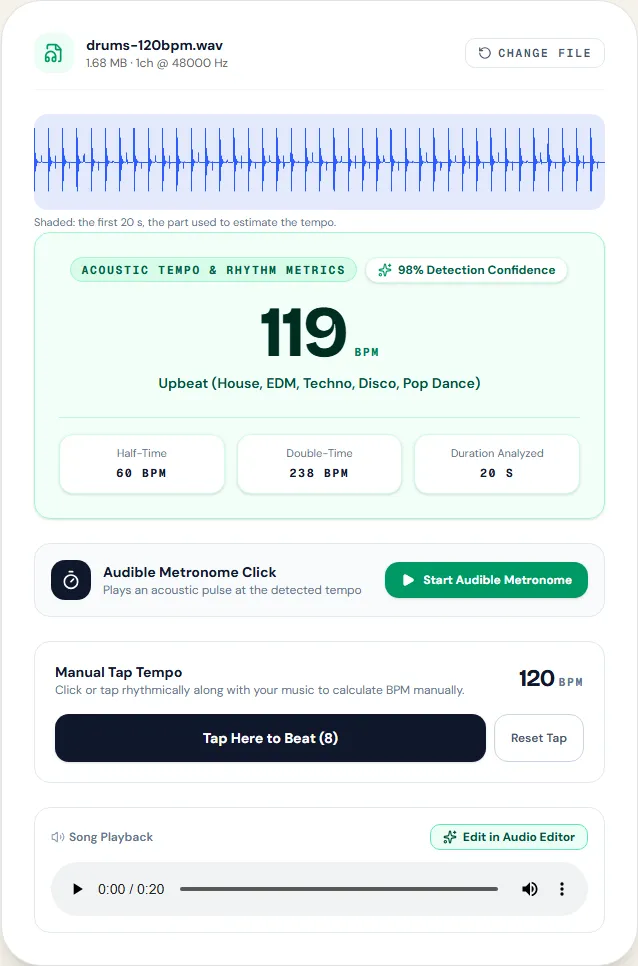
Play the song and press Tap Here to Beat on each beat, 4 to 8 times. The widget averages the intervals between your taps. Start Audible Metronome plays a click at the detected tempo; if the click drifts against the music, the detected value is off or the song changes tempo.
Typical tempo ranges
| Style | Usual range | Watch for |
|---|---|---|
| Hip-hop, lo-fi | 70 – 95 | Detected at double (140–190) |
| Pop, R&B, reggaeton | 90 – 120 | Syncopation can confuse the level |
| House, techno, disco | 118 – 135 | Usually detected well: steady kick |
| Drum and bass, jungle | 160 – 180 | Detected at half (80–90) |
Putting the number to work
A BPM value turns into time with one formula: seconds per beat = 60 ÷ BPM. Most pop and dance music groups beats in bars of four, so a bar lasts four times that.
| BPM | One beat | One bar (4 beats) |
|---|---|---|
| 90 | 0.67 s | 2.67 s |
| 120 | 0.50 s | 2.00 s |
| 128 | 0.47 s | 1.88 s |
| 174 | 0.34 s | 1.38 s |
- Video editing: cutting every bar (2 s at 120 BPM) or every two bars feels natural; cutting on single beats feels frantic except in fast montages.
- DJ mixing: two tracks blend smoothly when their tempos are within a few percent; a 124 BPM track sped up to 128 changes by 3.2%, which most listeners will not notice.
- Running playlists: many runners take 160 to 180 steps per minute, so songs at 80 to 90 BPM work at one step per half-beat and songs at 160 to 180 at one step per beat.
If a song is close but not exact, the speed tool can adjust its tempo while keeping the pitch.
Measured example
We synthesized 20 seconds of kick drum on every beat and hi-hat between beats at exactly 120 BPM, and dropped the file on the tool page.
The page reported 119 BPM for a loop at 120 BPM, an error of 1 BPM.
| Measured | Expected | Reported |
|---|---|---|
| Tempo | 120 BPM | 119 BPM |
A perfectly regular synthetic loop is the easy case. Real songs with swing, tempo drift or no drums are harder, and the result can land on half or double the tempo; confirm with tap tempo.
Download the reference file (WAV) · Same test on the tool page · Measured on November 11, 2026
A 1 BPM error matters less than it sounds. For DJ mixing, 1 BPM over a minute is about half a beat, which is why DJs nudge the pitch by ear anyway. For video editing on the beat, confirm with tap tempo or the metronome.
Troubleshooting
| What you hear or see | Likely cause | What to change |
|---|---|---|
| The result is half or double what you expect | The detector chose a different pulse level | Use the Half-Time or Double-Time value, or confirm with tap tempo |
| The result changes a lot between songs of the same style | Weak or absent drums in the first 20 seconds | Trim the intro so the analysed part has the beat |
| The metronome drifts against the music | The song speeds up or slows down (live recording) | Tap tempo in the section you need; one number cannot describe a changing tempo |
| Very low confidence | Ambient music, rubato, or no clear onsets | Rely on tap tempo |
| Tap tempo jumps around | Too few taps or uneven tapping | Reset and tap 8 times on the kick or snare |
Limits
The detector gives one tempo for the first 20 seconds. It does not draw a beat grid, find the first beat of the bar (the downbeat), follow tempo changes, or detect the musical key. In our automated tests on synthetic drum loops it lands within 1 BPM at 90, 120 and 128 BPM; it has not been measured on a set of commercial songs, where swing, live drummers and sparse arrangements make detection harder. DJ software and DAWs that analyse the whole track and build a beat grid are the right tools when you need more than a number.
Frequently asked questions
How accurate is the BPM finder?
Why does it say 60 when the song feels like 120?
What does the confidence percentage mean?
Can it find the key of a song?
Is the song uploaded?
Sources and how this was tested
- Wikipedia: Beat detection (onset and autocorrelation methods)
- Wikipedia: Tempo (BPM and typical ranges)
Tested on November 12, 2026 in Chromium 153 on Windows 11, with a production build of this site. Screenshots and measurements were made by the scripts in scripts/tool-evidence, from synthetic reference files anyone can download and repeat.